Unlock a world of possibilities! Login now and discover the exclusive benefits awaiting you.

- Qlik Community
- :
- All Forums
- :
- QlikView
- :
- Read header
- Subscribe to RSS Feed
- Mark Topic as New
- Mark Topic as Read
- Float this Topic for Current User
- Bookmark
- Subscribe
- Mute
- Printer Friendly Page

 pgalvezt
- Mark as New
- Bookmark
- Subscribe
- Mute
- Subscribe to RSS Feed
- Permalink
- Report Inappropriate Content
Read header
Hi,
Actually I have had reading multiples xls from 1 folder.
Problem is four of the all headers are 1 row upper in excel and in their place there are numbers. Those numbers goes changing according to excel file. I Ittached an enviroment excel file explaining the situation. How qlikview can read this?
Thanks!
Accepted Solutions
pgalvezt
- Mark as New
- Bookmark
- Subscribe
- Mute
- Subscribe to RSS Feed
- Permalink
- Report Inappropriate Content
Here is the solution, In label I Changed all names and then delete the 2nd row. Now QlikView read all field documents very well...
(biff, embedded labels, table is GENERAL$, filters(
Remove(Row, Pos(Top, 5)),
Remove(Row, Pos(Top, 4)),
Remove(Row, Pos(Top, 3)),
Remove(Row, Pos(Top, 2)),
Remove(Row, Pos(Top, 1)),
Top(1, 'Rut'),
Top(2, 'Nombre'),
Top(3, 'H. Pactadas'),
Top(4, 'Lunes'),
Top(5, 'Martes'),
Top(6, 'Miercoles'),
Top(7, 'Jueves'),
Top(8, 'Viernes'),
Top(9, 'Sabado'),
Top(10, 'Domingo'),
Top(11, 'Semanales'),
Top(12, 'Ordinarias'),
Top(13, 'H. Extras'),
Top(14, 'D. Trabajados'),
Top(15, 'Locomocion'),
Top(20, 'Errores'),
Top(21, 'Entero'),
Top(22, 'Hora'),
Top(23, 'Status'),
Top(24, 'CeCo'),
Top(25, 'Cod. CeCo'),
Top(26, 'Sueldo'),
Top(27, 'Nomina'),
Top(28, 'Cargo'),
Top(29, 'xx'),
Remove(Row, Pos(Top, 2))
));

 HirisH_V7
- Mark as New
- Bookmark
- Subscribe
- Mute
- Subscribe to RSS Feed
- Permalink
- Report Inappropriate Content
Hi,
May be like this,
Data:
LOAD Name,
     Number,
     Account,
     ID,
     Sale,
     Sale%,
     [Header a],
     [Header b],
     [Header c],
     [Header d]
FROM
[ColumnHeaderProblem*.xlsx]
(ooxml, embedded labels, table is [What I Have], filters(
Replace(1, bottom, StrCnd(null)),
Replace(2, bottom, StrCnd(null)),
Replace(3, bottom, StrCnd(null)),
Replace(4, bottom, StrCnd(null)),
Replace(1, bottom, StrCnd(null)),
Replace(5, bottom, StrCnd(null)),
Replace(6, bottom, StrCnd(null)),
Remove(Row, Pos(Top, 2))
));
Table:
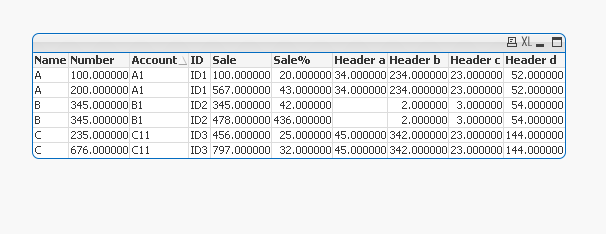
Hope this helps,
PFA,
Hirish
pgalvezt
- Mark as New
- Bookmark
- Subscribe
- Mute
- Subscribe to RSS Feed
- Permalink
- Report Inappropriate Content
Hi, Thank you for your reply,
Question? Did you use a table qlikview assistance? (Transform)?
pgalvezt
- Mark as New
- Bookmark
- Subscribe
- Mute
- Subscribe to RSS Feed
- Permalink
- Report Inappropriate Content
I try with code, and I try wih table assistance (Here I think you did something)... I don´t know what thing is...
I attach my test sample with base data... Is the same to the real in format.
pgalvezt
- Mark as New
- Bookmark
- Subscribe
- Mute
- Subscribe to RSS Feed
- Permalink
- Report Inappropriate Content
Here is the solution, In label I Changed all names and then delete the 2nd row. Now QlikView read all field documents very well...
(biff, embedded labels, table is GENERAL$, filters(
Remove(Row, Pos(Top, 5)),
Remove(Row, Pos(Top, 4)),
Remove(Row, Pos(Top, 3)),
Remove(Row, Pos(Top, 2)),
Remove(Row, Pos(Top, 1)),
Top(1, 'Rut'),
Top(2, 'Nombre'),
Top(3, 'H. Pactadas'),
Top(4, 'Lunes'),
Top(5, 'Martes'),
Top(6, 'Miercoles'),
Top(7, 'Jueves'),
Top(8, 'Viernes'),
Top(9, 'Sabado'),
Top(10, 'Domingo'),
Top(11, 'Semanales'),
Top(12, 'Ordinarias'),
Top(13, 'H. Extras'),
Top(14, 'D. Trabajados'),
Top(15, 'Locomocion'),
Top(20, 'Errores'),
Top(21, 'Entero'),
Top(22, 'Hora'),
Top(23, 'Status'),
Top(24, 'CeCo'),
Top(25, 'Cod. CeCo'),
Top(26, 'Sueldo'),
Top(27, 'Nomina'),
Top(28, 'Cargo'),
Top(29, 'xx'),
Remove(Row, Pos(Top, 2))
));
HirisH_V7
- Mark as New
- Bookmark
- Subscribe
- Mute
- Subscribe to RSS Feed
- Permalink
- Report Inappropriate Content
 Yup I used qlikview transform.
Fine your Query Solved.
-Hirish
