Unlock a world of possibilities! Login now and discover the exclusive benefits awaiting you.

- Qlik Community
- :
- All Forums
- :
- QlikView
- :
- Reducing max amount in chart
Options
- Subscribe to RSS Feed
- Mark Topic as New
- Mark Topic as Read
- Float this Topic for Current User
- Bookmark
- Subscribe
- Mute
- Printer Friendly Page
Turn on suggestions
Auto-suggest helps you quickly narrow down your search results by suggesting possible matches as you type.
Showing results for

Not applicable
2015-09-11
09:04 AM
- Mark as New
- Bookmark
- Subscribe
- Mute
- Subscribe to RSS Feed
- Permalink
- Report Inappropriate Content
Reducing max amount in chart
Hi All
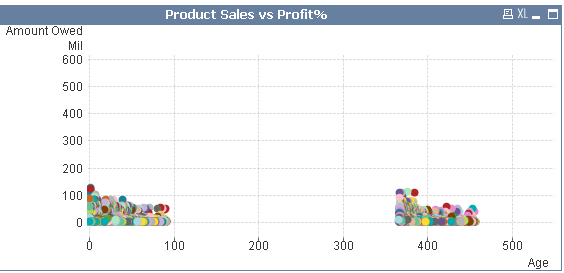
I have a Scatter which sums a value on the Y-axis. This value however goes up to 600mil which is unnecessarily high becuase the values only go up to about 150mil, now all the data is sitting at the bottom and a huge amount of space is not utilized which does not look nice.
How can I reduce this number to a desired number?
- Tags:
- new_to_qlikview
1,000 Views
1 Solution
Accepted Solutions

 Gysbert_Wassena
Partner - Champion III
2015-09-11
09:25 AM
- Mark as New
- Bookmark
- Subscribe
- Mute
- Subscribe to RSS Feed
- Permalink
- Report Inappropriate Content
Adjust the Static Min and Static Max settings for the axes on the Axes tab.
talk is cheap, supply exceeds demand
2 Replies
Gysbert_Wassena
Partner - Champion III
2015-09-11
09:25 AM
- Mark as New
- Bookmark
- Subscribe
- Mute
- Subscribe to RSS Feed
- Permalink
- Report Inappropriate Content
Adjust the Static Min and Static Max settings for the axes on the Axes tab.
talk is cheap, supply exceeds demand
Not applicable
2015-09-11
09:30 AM
Author
- Mark as New
- Bookmark
- Subscribe
- Mute
- Subscribe to RSS Feed
- Permalink
- Report Inappropriate Content
Thanks Gysbert! 
954 Views