Unlock a world of possibilities! Login now and discover the exclusive benefits awaiting you.

- Qlik Community
- :
- All Forums
- :
- QlikView
- :
- Regarding Rank() in Expression for TOP 10
- Subscribe to RSS Feed
- Mark Topic as New
- Mark Topic as Read
- Float this Topic for Current User
- Bookmark
- Subscribe
- Mute
- Printer Friendly Page

 sarfaraz_sheikh
- Mark as New
- Bookmark
- Subscribe
- Mute
- Subscribe to RSS Feed
- Permalink
- Report Inappropriate Content
Regarding Rank() in Expression for TOP 10
Dear All,
I used rank() in expression defination for calculating top 10...and i got that but in front of dimension other than top 10 showing " - " this symbol .....how i can suppress them in chart...
below is my expression :-
=if(Rank(Count( {<SUB_VERTICAL_DESC={'AUTO'} >} SI_NO)) <=10,Count( {<SUB_VERTICAL_DESC={'AUTO'} >} SI_NO))
Kindly help !!!!
Regards
Sarfaraz
- Tags:
- new_to_qlikview
- « Previous Replies
-
- 1
- 2
- Next Replies »

 mdmukramali
- Mark as New
- Bookmark
- Subscribe
- Mute
- Subscribe to RSS Feed
- Permalink
- Report Inappropriate Content
Dear Sarfaraz,
in your attached Qvw file ,where it's showing '-' other than Dimensions?
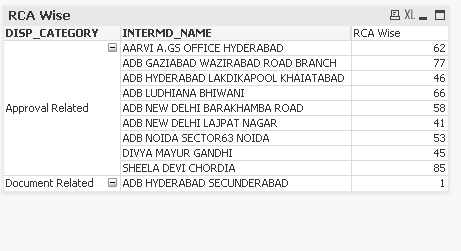
Thanks,
Mukram
sarfaraz_sheikh
- Mark as New
- Bookmark
- Subscribe
- Mute
- Subscribe to RSS Feed
- Permalink
- Report Inappropriate Content
Dear Mukram,
Can u please post expression or QVW so it will be good to understand .........
Sarfaraz
sarfaraz_sheikh
- Mark as New
- Bookmark
- Subscribe
- Mute
- Subscribe to RSS Feed
- Permalink
- Report Inappropriate Content
Dear All,
Please look into matter.........its urgent .kindly help...
Sarfaraz

- Mark as New
- Bookmark
- Subscribe
- Mute
- Subscribe to RSS Feed
- Permalink
- Report Inappropriate Content
Hi
If you are talking about symbol before top 10 values in dimension, then go to presentation tab and check "always fully expanded" in your pivot table. Other than that I dont see any "-" symbol in dimension.
HTH
Amay
sarfaraz_sheikh
- Mark as New
- Bookmark
- Subscribe
- Mute
- Subscribe to RSS Feed
- Permalink
- Report Inappropriate Content
Dear Amay,
I am taking about symbol "-" which is showing in expression ......i dont want blank value in expression after calculating top 10 ...i just want top 10 to be appear in expression i dont want blank there ..
Sarfaraz
mdmukramali
- Mark as New
- Bookmark
- Subscribe
- Mute
- Subscribe to RSS Feed
- Permalink
- Report Inappropriate Content
Dear Sarfaraz,
Find the attached file.
and No Blank value in the Expression.
if your still able to see the blank value then please show as the blank value in the chart by taking the image.

sarfaraz_sheikh
- Mark as New
- Bookmark
- Subscribe
- Mute
- Subscribe to RSS Feed
- Permalink
- Report Inappropriate Content
Dear Mukram,
Please have the look on below screenshot..........
Sarfaraz

 krishna20
- Mark as New
- Bookmark
- Subscribe
- Mute
- Subscribe to RSS Feed
- Permalink
- Report Inappropriate Content
Hi Sheikh,
Try Like this
=aggr(if(Rank(total Sum([Revenue]))<=30, YourDimension), YourDimension)
Regards
Krishna
- « Previous Replies
-
- 1
- 2
- Next Replies »