Unlock a world of possibilities! Login now and discover the exclusive benefits awaiting you.

- Qlik Community
- :
- All Forums
- :
- QlikView
- :
- Related islands
- Subscribe to RSS Feed
- Mark Topic as New
- Mark Topic as Read
- Float this Topic for Current User
- Bookmark
- Subscribe
- Mute
- Printer Friendly Page

- Mark as New
- Bookmark
- Subscribe
- Mute
- Subscribe to RSS Feed
- Permalink
- Report Inappropriate Content
Related islands
Hi guys,
I have simplified my case to below inline load:
Data :
LOAD * INLINE [
Feature, Attribute, ID
Colour, Green, 1
Size, Big, 1
Shape, Triangle, 1
Colour, Green, 2
Size, Small, 2
Quality, Good, 2
Material, Plastic, 2
Colour, Red, 3
Shape, Square, 3
Size, Big, 4
Material, Metal, 4
Weight, Heavy, 4
];
One :
load
Feature as Feature1 ,
Attribute as Attribute1
resident Data
;
Two :
load
Feature as Feature2 ,
Attribute as Attribute2
resident Data
;
I have got multibox and pivot table chart as below:
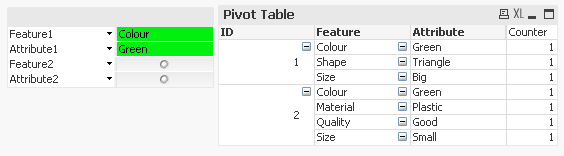
Expressions for pivot table are (depending on condition):
1. when GetSelectedCount(Attribute1)>0 and GetSelectedCount(Feature2)=0
= count ( {
<ID = P({<Feature={"$(=only([Feature1]))"} , Attribute={"$(=only([Attribute1]))"}> } ID)>
} ID )
2. when GetSelectedCount(Feature2)>0 and GetSelectedCount(Attribute2)=0
= count ( {
<ID = P({<Feature={"$(=only([Feature1]))"} , Attribute={"$(=only([Attribute1]))"}> } ID)>
*
<ID = P({<Feature={"$(=only([Feature2]))"} ID)>
} ID )
I have attached qvw.
My issue is that I would like multibox to show me not all Feature2 as it is now but only related (in below case Weight is not related),
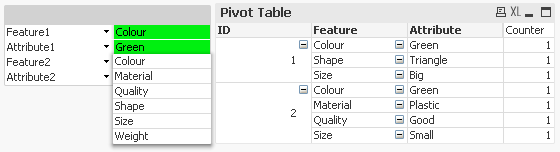
Which expression I should use?
Thank You Gentlemen for Your Help & Consideration,
Sebastian

 michael_maeuser
- Mark as New
- Bookmark
- Subscribe
- Mute
- Subscribe to RSS Feed
- Permalink
- Report Inappropriate Content
maybe you should do the whole thing another way, see attached AND-Mode...
another possibility could be alternate states.
Does that help?
- Mark as New
- Bookmark
- Subscribe
- Mute
- Subscribe to RSS Feed
- Permalink
- Report Inappropriate Content
Bump