Unlock a world of possibilities! Login now and discover the exclusive benefits awaiting you.

- Qlik Community
- :
- All Forums
- :
- QlikView
- :
- Remove Am and pm from Time Interval
- Subscribe to RSS Feed
- Mark Topic as New
- Mark Topic as Read
- Float this Topic for Current User
- Bookmark
- Subscribe
- Mute
- Printer Friendly Page

- Mark as New
- Bookmark
- Subscribe
- Mute
- Subscribe to RSS Feed
- Permalink
- Report Inappropriate Content
Remove Am and pm from Time Interval
I have created a field by using
INTERVAL(TIMESTAMP(ReloadTime(),'hhh:mm:ss')- INTERVAL(TIMESTAMP(EvDate),'hhh:mm:ss')) AS Trial,
And I believe the data is correct However, I would like to remove the AM and PM Fields, , I have attached a ss . Thank You in advance .

Accepted Solutions

 maxgro
- Mark as New
- Bookmark
- Subscribe
- Mute
- Subscribe to RSS Feed
- Permalink
- Report Inappropriate Content
=interval(reloadtime() - timestamp(today()-1), 'hh:mm:ss')
=interval(reloadtime() - timestamp(EvDate), 'hh:mm:ss')
- Mark as New
- Bookmark
- Subscribe
- Mute
- Subscribe to RSS Feed
- Permalink
- Report Inappropriate Content
Perhaps a string function like subfield would work:
=subset(Trial,' ', 1)
Matt

.png "Former Employee") Greg_Williams
Greg_Williams
- Mark as New
- Bookmark
- Subscribe
- Mute
- Subscribe to RSS Feed
- Permalink
- Report Inappropriate Content
Perhaps this might help (with formatting) of the timestamp.
- Mark as New
- Bookmark
- Subscribe
- Mute
- Subscribe to RSS Feed
- Permalink
- Report Inappropriate Content
I ended up using Subfield at the script level
SubField(INTERVAL(TIMESTAMP(ReloadTime(),'hhh:mm:ss')- INTERVAL(TIMESTAMP(EvDate),'hhh:mm:ss')),' ',1))
Which is giving me
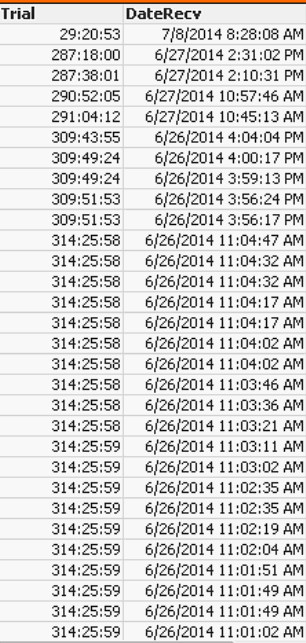 I am getting what I need but do you think it is the wrong way?
Will I have problems doing aggregations on this, it seems to be working as of now
maxgro
- Mark as New
- Bookmark
- Subscribe
- Mute
- Subscribe to RSS Feed
- Permalink
- Report Inappropriate Content
=interval(reloadtime() - timestamp(today()-1), 'hh:mm:ss')
=interval(reloadtime() - timestamp(EvDate), 'hh:mm:ss')

 jaimeaguilar
- Mark as New
- Bookmark
- Subscribe
- Mute
- Subscribe to RSS Feed
- Permalink
- Report Inappropriate Content
Hi,
Enclose your formula with Time(Your_Formula, 'hh:mm:ss'). This way your time data will be displayed just in hours, minutes and seconds disregarding the AM/PM,
regards
- Mark as New
- Bookmark
- Subscribe
- Mute
- Subscribe to RSS Feed
- Permalink
- Report Inappropriate Content
That Worked perfectly Thank You so much!