Unlock a world of possibilities! Login now and discover the exclusive benefits awaiting you.

- Qlik Community
- :
- All Forums
- :
- QlikView
- :
- Re: Remove Chart Line Drop when value is 0 in the ...
- Subscribe to RSS Feed
- Mark Topic as New
- Mark Topic as Read
- Float this Topic for Current User
- Bookmark
- Subscribe
- Mute
- Printer Friendly Page

 stevegimbrollmt
- Mark as New
- Bookmark
- Subscribe
- Mute
- Subscribe to RSS Feed
- Permalink
- Report Inappropriate Content
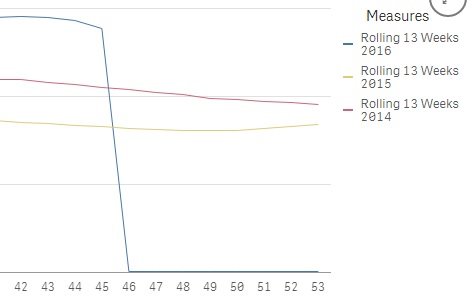
Remove Chart Line Drop when value is 0 in the end
Hi friends,
Does anyone has a proper solution in removing this particular drop and leave it till the previous week where there was the last record.
Thank you
- Tags:
- line char

 tresB
tresB
- Mark as New
- Bookmark
- Subscribe
- Mute
- Subscribe to RSS Feed
- Permalink
- Report Inappropriate Content
It seems that - with multiple expressions (lines) it is difficult (if not impossible in qlik sense natively). Had you have single line you could probably control that using an expression like: Sum( {<WeekNum={"=Sum(Sales)>0"}>}Sales)
Assuming your dimension is WeekNum.
stevegimbrollmt
- Mark as New
- Bookmark
- Subscribe
- Mute
- Subscribe to RSS Feed
- Permalink
- Report Inappropriate Content
Yeah I know and its so annoying, I might need to get it custom made.. will be checking the library to see if there are any solutions for it.
Thanks mate

 shraddha_g
- Mark as New
- Bookmark
- Subscribe
- Mute
- Subscribe to RSS Feed
- Permalink
- Report Inappropriate Content
In Add-Ons section -> Data Handling - > uncheck Show Zero values
stevegimbrollmt
- Mark as New
- Bookmark
- Subscribe
- Mute
- Subscribe to RSS Feed
- Permalink
- Report Inappropriate Content
I wish it was this easy... no it doesnt work . thanks
 darrell_tobin
- Mark as New
- Bookmark
- Subscribe
- Mute
- Subscribe to RSS Feed
- Permalink
- Report Inappropriate Content
Qlik is doing this because the 'measure' is returning a value of 0. To fix this we need to replace 0 with null.
Use an if function as in the expression below:
=If(
Sum(Sales) = 0, // where sum(Sales) is you measure
Null(),
Sum(Sales)
)
This expression will replace 0 with null which should stop the line from showing.
