Unlock a world of possibilities! Login now and discover the exclusive benefits awaiting you.

- Qlik Community
- :
- All Forums
- :
- QlikView
- :
- Remove the Label from the first dimension
- Subscribe to RSS Feed
- Mark Topic as New
- Mark Topic as Read
- Float this Topic for Current User
- Bookmark
- Subscribe
- Mute
- Printer Friendly Page

- Mark as New
- Bookmark
- Subscribe
- Mute
- Subscribe to RSS Feed
- Permalink
- Report Inappropriate Content
Remove the Label from the first dimension
Hello,
I've a bar Chart with two dimensions (And I need both in my dimension tab) and I want to hive the label of first dimension.
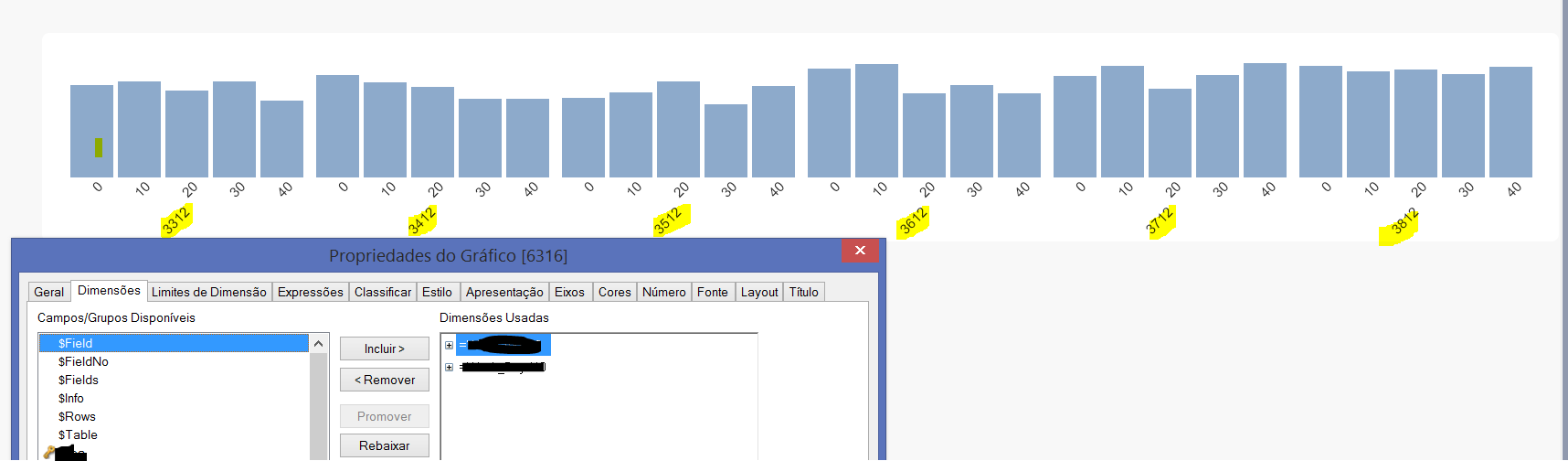
If you see in this image, I want to remove the label marked with yellow corresponding to the 1st dimension.
I try to:
- put the colour to white in Dimension Tab but it still black
- put the colour to white in Axis Tab but with that I hide both labels
THANKS 
Accepted Solutions

 swuehl
- Mark as New
- Bookmark
- Subscribe
- Mute
- Subscribe to RSS Feed
- Permalink
- Report Inappropriate Content
If your dimension values are numbers, try a calculated dimension
=Dual( ' ' , YourFirstDimension)
swuehl
- Mark as New
- Bookmark
- Subscribe
- Mute
- Subscribe to RSS Feed
- Permalink
- Report Inappropriate Content
If your dimension values are numbers, try a calculated dimension
=Dual( ' ' , YourFirstDimension)

 vinafidalgo
- Mark as New
- Bookmark
- Subscribe
- Mute
- Subscribe to RSS Feed
- Permalink
- Report Inappropriate Content
Can you upload your QVW please?
 NZFei
NZFei
- Mark as New
- Bookmark
- Subscribe
- Mute
- Subscribe to RSS Feed
- Permalink
- Report Inappropriate Content
Edit the first dimension to if(len(trim(Dimension1Name))>0, ' ')
So basically replace the dimension 1 content with a space ' '.

 Digvijay_Singh
- Mark as New
- Bookmark
- Subscribe
- Mute
- Subscribe to RSS Feed
- Permalink
- Report Inappropriate Content
What if you uncheck 'Show legend' for the dimension in dimension tab.
 Chanty4u
- Mark as New
- Bookmark
- Subscribe
- Mute
- Subscribe to RSS Feed
- Permalink
- Report Inappropriate Content
did u try this?