Unlock a world of possibilities! Login now and discover the exclusive benefits awaiting you.

- Qlik Community
- :
- All Forums
- :
- QlikView
- :
- Rename fields, value as fieldname
- Subscribe to RSS Feed
- Mark Topic as New
- Mark Topic as Read
- Float this Topic for Current User
- Bookmark
- Subscribe
- Mute
- Printer Friendly Page

 fred_s
- Mark as New
- Bookmark
- Subscribe
- Mute
- Subscribe to RSS Feed
- Permalink
- Report Inappropriate Content
Rename fields, value as fieldname
Hi,
I have these two tables, tblmain and tblcodes:
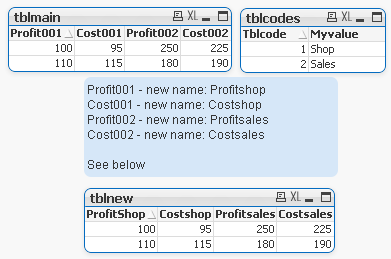
What I need to achieve is a new table based on the first tables,
where the fieldnames of table 1 (tblmain) are renamed Myvalue of table 2 (tblcodes).
Anyone?
(example file attached)
Thanks in advance
- Tags:
- rename_fields
Accepted Solutions

 swuehl
- Mark as New
- Bookmark
- Subscribe
- Mute
- Subscribe to RSS Feed
- Permalink
- Report Inappropriate Content
Maybe like this:
tblmain:
LOAD * INLINE [
Profit001, Cost001, Profit002, Cost002
100, 95, 250, 225
110, 115, 180, 190
];
tblcodes:
mapping LOAD * INLINE [
Tblcode, Myvalue
1, Shop
2, Sales
];
for i = 1 to NoOfFields('tblmain')
Let vNameOrig = FieldName($(i),'tblmain');
let vNameNew = purgechar('$(vNameOrig)','0123456789') & applymap('tblcodes',num(keepchar('$(vNameOrig)','0123456789')));
rename field $(vNameOrig) to $(vNameNew);
next
Hope this helps,
Stefan
edit: If you don't like the CamelCase of your new field names, you could either use
let vNameNew = Capitalize(purgechar('$(vNameOrig)','0123456789') & applymap('tblcodes',num(keepchar('$(vNameOrig)','0123456789'))));
or
let vNameNew = purgechar('$(vNameOrig)','0123456789') & lower(applymap('tblcodes',num(keepchar('$(vNameOrig)','0123456789'))));
swuehl
- Mark as New
- Bookmark
- Subscribe
- Mute
- Subscribe to RSS Feed
- Permalink
- Report Inappropriate Content
Maybe like this:
tblmain:
LOAD * INLINE [
Profit001, Cost001, Profit002, Cost002
100, 95, 250, 225
110, 115, 180, 190
];
tblcodes:
mapping LOAD * INLINE [
Tblcode, Myvalue
1, Shop
2, Sales
];
for i = 1 to NoOfFields('tblmain')
Let vNameOrig = FieldName($(i),'tblmain');
let vNameNew = purgechar('$(vNameOrig)','0123456789') & applymap('tblcodes',num(keepchar('$(vNameOrig)','0123456789')));
rename field $(vNameOrig) to $(vNameNew);
next
Hope this helps,
Stefan
edit: If you don't like the CamelCase of your new field names, you could either use
let vNameNew = Capitalize(purgechar('$(vNameOrig)','0123456789') & applymap('tblcodes',num(keepchar('$(vNameOrig)','0123456789'))));
or
let vNameNew = purgechar('$(vNameOrig)','0123456789') & lower(applymap('tblcodes',num(keepchar('$(vNameOrig)','0123456789'))));
fred_s
- Mark as New
- Bookmark
- Subscribe
- Mute
- Subscribe to RSS Feed
- Permalink
- Report Inappropriate Content
Hi swuehl,
Looks like you solved it!
Thanks a lot
Regards,
Fred
