Unlock a world of possibilities! Login now and discover the exclusive benefits awaiting you.

- Qlik Community
- :
- All Forums
- :
- QlikView
- :
- Renaming CSV files using variables
- Subscribe to RSS Feed
- Mark Topic as New
- Mark Topic as Read
- Float this Topic for Current User
- Bookmark
- Subscribe
- Mute
- Printer Friendly Page

- Mark as New
- Bookmark
- Subscribe
- Mute
- Subscribe to RSS Feed
- Permalink
- Report Inappropriate Content
Renaming CSV files using variables
Hello everyone,
I am working in a project where the database are CSV files and it is updated year by year.
The CSV name files are described as follow:
Report.xlsx
Report 2014.xlsx
Report 2015.xlsx
Report 2016.xlsx
I need QlikView LOAD all the files above and when the 2017 file is included in the folder, it will be automatically loaded.
I could easily use * in the name of the file, but i am loading my database from a web repository, so my FROM command is an URL and it is not possible to use * in the file name like that:
LOAD *
FROM
[http://la2.collaboration..com/team/20124c20/Documents/Report*.xlsx]
In that case, anyone could help me to solve that using variable?
Regards,
- Tags:
- new_to_qlikview
- « Previous Replies
-
- 1
- 2
- Next Replies »
Accepted Solutions

 Nicole-Smith
- Mark as New
- Bookmark
- Subscribe
- Mute
- Subscribe to RSS Feed
- Permalink
- Report Inappropriate Content
What about something like this?
FOR i=2014 TO year(today())
     LOAD *
     FROM [LINK/Report $(i).xlsx];
NEXT

SET i =;
Nicole-Smith
- Mark as New
- Bookmark
- Subscribe
- Mute
- Subscribe to RSS Feed
- Permalink
- Report Inappropriate Content
What about something like this?
FOR i=2014 TO year(today())
     LOAD *
     FROM [LINK/Report $(i).xlsx];
NEXT

SET i =;
- Mark as New
- Bookmark
- Subscribe
- Mute
- Subscribe to RSS Feed
- Permalink
- Report Inappropriate Content
Hello Nicole,
Thanks for your tip.
The script was executed with no errors, but it just loaded the spreadsheet from 2014.
I need that files from all years be loaded.
Thanks,

 petter
- Mark as New
- Bookmark
- Subscribe
- Mute
- Subscribe to RSS Feed
- Permalink
- Report Inappropriate Content
Are you sure you didnt get all the years in? They would be stored in one single table - they would be auto concatenated by QlikView during load since the column names would be similar...
Nicole-Smith
- Mark as New
- Bookmark
- Subscribe
- Mute
- Subscribe to RSS Feed
- Permalink
- Report Inappropriate Content
They should all be in there. Are the files definitely named the same except for the year?
- Mark as New
- Bookmark
- Subscribe
- Mute
- Subscribe to RSS Feed
- Permalink
- Report Inappropriate Content
I have checked the data and unfortunately it was loaded only info from 2014.
The column names are exactly the same in all the spreadsheets, the only difference is in the name of the files.
I didn´t understand what this code is for "SET i =; "
What is intended to be done here?
- Mark as New
- Bookmark
- Subscribe
- Mute
- Subscribe to RSS Feed
- Permalink
- Report Inappropriate Content
Yes Nicole, i have checked again, and the File name are the same, except for the year, see the print screen below:
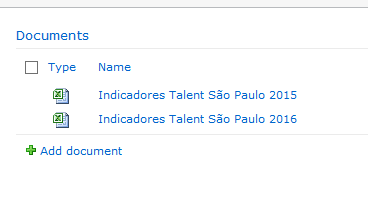
PS: I used the name "Report" just as an example.
 daveamz
- Mark as New
- Bookmark
- Subscribe
- Mute
- Subscribe to RSS Feed
- Permalink
- Report Inappropriate Content
Hi Rodrigo,
Try to convert the spaces in %20 -> http://www.w3schools.com/tags/ref_urlencode.asp
...
FROM [LINK/Indicadores%20Talent%20%S%E3o%20Paulo$(i).xlsx] (here I converted ã as well)
Check the actual link to the file.
Regards,
David
P.S. SET i=; deletes the variable as it is no longer needed. Similar with LET i=Null();
 rwunderlich
- Mark as New
- Bookmark
- Subscribe
- Mute
- Subscribe to RSS Feed
- Permalink
- Report Inappropriate Content
Look in the document log. How many times was the LOAD statement executed?
-Rob
- Mark as New
- Bookmark
- Subscribe
- Mute
- Subscribe to RSS Feed
- Permalink
- Report Inappropriate Content
Hi David!
Thanks for your answer.
The spaces are already with %20... I converted ã to %E3 but nothing changed.
- « Previous Replies
-
- 1
- 2
- Next Replies »