Unlock a world of possibilities! Login now and discover the exclusive benefits awaiting you.

- Qlik Community
- :
- All Forums
- :
- QlikView
- :
- Replacing characters in field
- Subscribe to RSS Feed
- Mark Topic as New
- Mark Topic as Read
- Float this Topic for Current User
- Bookmark
- Subscribe
- Mute
- Printer Friendly Page

- Mark as New
- Bookmark
- Subscribe
- Mute
- Subscribe to RSS Feed
- Permalink
- Report Inappropriate Content
Replacing characters in field
Hi
I understand the concept of using subfield to help showing or hiding characters.
I have a bit more tricky one
Say I have the follwing
1223867hrg.h345#IWantToSeeThisOnly#
what would be the best way to only see everything between the two # characters

 sunny_talwar
- Mark as New
- Bookmark
- Subscribe
- Mute
- Subscribe to RSS Feed
- Permalink
- Report Inappropriate Content
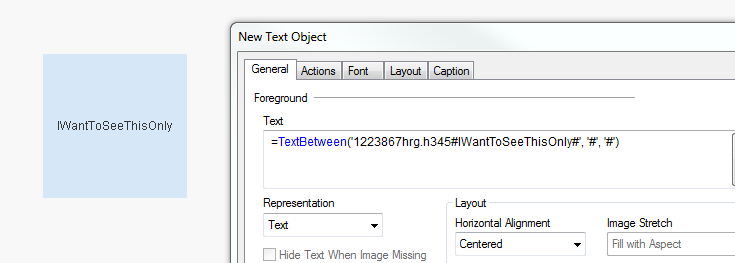
May be try TextBetween() here:
TextBetween('1223867hrg.h345#IWantToSeeThisOnly#', '#', '#')
- Mark as New
- Bookmark
- Subscribe
- Mute
- Subscribe to RSS Feed
- Permalink
- Report Inappropriate Content
Thanks works well, but it you have 50 of these in a column, in one row the # is character 4, and in another its character 30 in the fields
sunny_talwar
- Mark as New
- Bookmark
- Subscribe
- Mute
- Subscribe to RSS Feed
- Permalink
- Report Inappropriate Content
I don't think distance between #s make any difference. Its just picking up everything between the two #s
sunny_talwar
- Mark as New
- Bookmark
- Subscribe
- Mute
- Subscribe to RSS Feed
- Permalink
- Report Inappropriate Content
If you want to do this on a field, you just need this:
TextBetween(FieldName, '#', '#') as NewFieldName
sunny_talwar
- Mark as New
- Bookmark
- Subscribe
- Mute
- Subscribe to RSS Feed
- Permalink
- Report Inappropriate Content
Have a look at this script:
Table:
LOAD *,
TextBetween(FieldName, '#', '#') as NewFieldName;
LOAD * Inline [
FieldName
1223867hrg.h345#IWantToSeeThisOnly#
1asadasfscvtgsdfsfsd223867hrg.h345#AndThis#
1223867hrg.h345#MaybeTHIS#aDASDFSADFASFASDAS
ADASDADASDAFASCFSFG1223867hrg.h345#Alrightletsgetthistoo#SFASFASFASFSA
ADADWEFRVjgsfshfgkjerghcuiahnuifajfgweuifbajksdfgasfhasklfhalscnuekdhjhf1223867hrg.h345#Justonelast#gdasjdgajfgakfga
];

- Mark as New
- Bookmark
- Subscribe
- Mute
- Subscribe to RSS Feed
- Permalink
- Report Inappropriate Content
Thanks. I will try this and let you know