Unlock a world of possibilities! Login now and discover the exclusive benefits awaiting you.

- Qlik Community
- :
- All Forums
- :
- QlikView
- :
- Reports
- Subscribe to RSS Feed
- Mark Topic as New
- Mark Topic as Read
- Float this Topic for Current User
- Bookmark
- Subscribe
- Mute
- Printer Friendly Page

 anjali0108
- Mark as New
- Bookmark
- Subscribe
- Mute
- Subscribe to RSS Feed
- Permalink
- Report Inappropriate Content
Reports
Hi All,
I need help in one logic.
I have two excels let's say A and B where I have similar data and similar columns namely :
1. System Name 2.Tags 3.Last Communication 4.DAT Version |
Now,column "Tags" is further subdivided as "Server and Workstation".
Also,for a particular date (i.e Last Communication ) ,for server we have to take rows with 'DAT Version' from n to n-2 as one report
and for workstation ,it should be from n to n-5.
I have to club these values as one report and rest as other report.
Have already tried some alternative but need some more help in completing logic for both.
I was trying rank but it was not giving me correct results.
For Example,
For any particular date,
>> Need to club the "system names" which have tags containing "Workstation" and "DAT Version" containing values n,n-1,n-2,n-3,n-4 and n-5 where n is the maximum value of "DAT Version" for that particular day.

For any particular date,
>> Need to club the "system names" which have tags containing "Server" and "DAT Version" containing values n,n-1,n-2 where n is the maximum value of "DAT Version" for that particular day.
This will be my 1st report and rest of the values should fall in other report.
Thanks in advance.
- Tags:
- qlikview_scripting

 vinieme12
- Mark as New
- Bookmark
- Subscribe
- Mute
- Subscribe to RSS Feed
- Permalink
- Report Inappropriate Content
can you also post expected output for the given sample?
If a post helps to resolve your issue, please accept it as a Solution.

 tajmohamed30
- Mark as New
- Bookmark
- Subscribe
- Mute
- Subscribe to RSS Feed
- Permalink
- Report Inappropriate Content
have you tried set analysis to build the logic
 felipedl
- Mark as New
- Bookmark
- Subscribe
- Mute
- Subscribe to RSS Feed
- Permalink
- Report Inappropriate Content
Hi Anjali,
Attached a QVW with formulas as to what I understood from your problem with the data you provided.
Regards,
Felipe.
anjali0108
- Mark as New
- Bookmark
- Subscribe
- Mute
- Subscribe to RSS Feed
- Permalink
- Report Inappropriate Content
Hi Felip,
Thanks a ton for taking out time for this.
But this is not the output I am expecting.
I am using this expression to make first report:
=If(Rank(max([DAT Version (VirusScan Enterprise)])) <=3 , [DAT Version (VirusScan Enterprise)])
and restricting top 5 values of DAT Version in dimension limits(FOR WORKSTATION) but that not able to merge server data in this.
PFB: EXPECTED OUTPUT
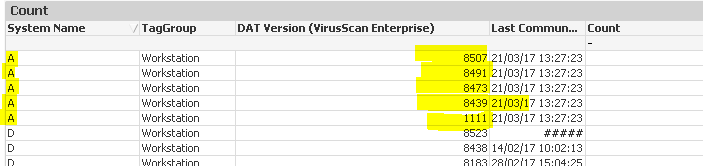
The above table should also contain 3 more rows with top 3 DAT Version for server as well for each date.
And the rest of the data should be there in other excel.
That's how I have to make 2 separate reports.
Hope you understand.
