Unlock a world of possibilities! Login now and discover the exclusive benefits awaiting you.

- Qlik Community
- :
- All Forums
- :
- QlikView
- :
- Rolling Quarter
- Subscribe to RSS Feed
- Mark Topic as New
- Mark Topic as Read
- Float this Topic for Current User
- Bookmark
- Subscribe
- Mute
- Printer Friendly Page

- Mark as New
- Bookmark
- Subscribe
- Mute
- Subscribe to RSS Feed
- Permalink
- Report Inappropriate Content
Rolling Quarter
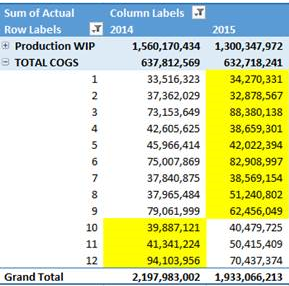
I am trying to do rolling quarters for the following data -
So, if I have selected Nov 2015, the result for both would be: 646,718,034 (accumulating all of the yellow numbers).
this is the code I am using for Rolling 12 months:
=Num(Sum({<[Account Description] = {'Total COGS'}, MonthYear = {"$(='>' & Date(AddMonths(Max(MonthYear), -12)) & '<=' & Date(Max(MonthYear)))"}, Year, Month, Quarter>} Actual),'#,##0')
I’ve tried modifying this code, but am getting the WRONG number: 768,163,421
=Num(Sum({<[Account Description] = {'Total COGS'},
MonthYear = {"$(='>' & Date(AddYears(QuarterStart(Max(MonthYear)), -1)) & '<=' & Date(Max(MonthYear)))"}, Year, Month, Quarter>}
Actual),'#,##0')

Also, when I select Sep 2015 (the end month of the quarter (Mar, Jun, Sep, Dec) – it shouldn’t go back one quarter). The values should be (instead they equal the value of the quarter before):
Mar 2015 = 649,309,604
Jun 2015 = 649,320,387
Sep 2015 = 646,718,034
Nov 2015 = 646,718,034
Dec 2015 = 632,718,241
Does anyone know of a solution?
Thank you for any assistance you can offer.
Kelly