Unlock a world of possibilities! Login now and discover the exclusive benefits awaiting you.

- Qlik Community
- :
- All Forums
- :
- QlikView
- :
- Row ID creation
- Subscribe to RSS Feed
- Mark Topic as New
- Mark Topic as Read
- Float this Topic for Current User
- Bookmark
- Subscribe
- Mute
- Printer Friendly Page

- Mark as New
- Bookmark
- Subscribe
- Mute
- Subscribe to RSS Feed
- Permalink
- Report Inappropriate Content
Row ID creation
I have following table:
| JS-No | Entry No | Row ID |
| JS-001 | 1 | 1 |
| JS-001 | 2 | 2 |
| JS-001 | 3 | 3 |
| JS-001 | 7 | 4 |
| JS-002 | 4 | 5 |
| JS-002 | 5 | 6 |
| JS-002 | 6 | 7 |
| JS-002 | 9 | 8 |
| JS-003 | 8 | 9 |
| JS-003 | 10 | 10 |
| JS-003 | 11 | 11 |
The input fields are JS-No and Entry No. But Bcoz there is a break in the entry no, i want to have RowID. it will first sort on the basis of JS-No and Entry no. and Row ID assigned to the result.
Can anyone help me with this?
Will be great if i get the output in q likview file.
- Mark as New
- Bookmark
- Subscribe
- Mute
- Subscribe to RSS Feed
- Permalink
- Report Inappropriate Content
Hi Kartik,
you can just use
Rowno() AS [Row ID]
in your script to generate that
hope that helps
Joe

 its_anandrjs
- Mark as New
- Bookmark
- Subscribe
- Mute
- Subscribe to RSS Feed
- Permalink
- Report Inappropriate Content
Hi,
You can use Autonumber() here but can you elaborate more with expected out put.
Load
Js-NO,
[Entry No],
Rowno() as [Row id]
From Source;
Regards
Anand
Regards
Anand

 alexandros17
- Mark as New
- Bookmark
- Subscribe
- Mute
- Subscribe to RSS Feed
- Permalink
- Report Inappropriate Content
Is this helpful?
AAA:
Load * Inline [
JS-No, Entry No
JS-001, 1
JS-001, 2
JS-001, 3
JS-001, 7
JS-002, 4
JS-002, 5
JS-002, 6
JS-002, 9
JS-003, 8
JS-003, 10
JS-003, 11
];
BBB:
NoConcatenate
LOAD * Resident AAA Order by [JS-No] asc, [Entry No] asc;
Drop Table AAA;
CCC:
NoConcatenate
LOAD *, RowNo() as RowNum Resident BBB;
Drop Table BBB;

 MarcoWedel
- Mark as New
- Bookmark
- Subscribe
- Mute
- Subscribe to RSS Feed
- Permalink
- Report Inappropriate Content
Hi,
one solution as a chart expression:
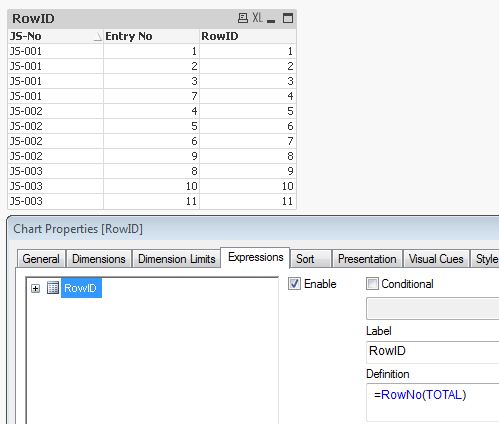
hope this helps
regards
Marco
- Mark as New
- Bookmark
- Subscribe
- Mute
- Subscribe to RSS Feed
- Permalink
- Report Inappropriate Content
Hi,
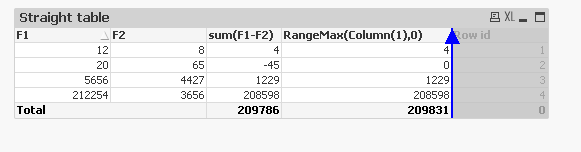
You can directly add a expression as rowno(),then drag it to first position.
Thanks