Unlock a world of possibilities! Login now and discover the exclusive benefits awaiting you.

- Qlik Community
- :
- All Forums
- :
- QlikView
- :
- Row wise customized total in straight table.
- Subscribe to RSS Feed
- Mark Topic as New
- Mark Topic as Read
- Float this Topic for Current User
- Bookmark
- Subscribe
- Mute
- Printer Friendly Page

 naushad786
- Mark as New
- Bookmark
- Subscribe
- Mute
- Subscribe to RSS Feed
- Permalink
- Report Inappropriate Content
Row wise customized total in straight table.
There is any solution to do customized total in straight table.
Straight table provide the total of all columns that exist by default, but my need is do the total condition wise. Can anyone help?
- « Previous Replies
-
- 1
- 2
- Next Replies »

- Mark as New
- Bookmark
- Subscribe
- Mute
- Subscribe to RSS Feed
- Permalink
- Report Inappropriate Content
Hi Naushad,
Just try to drag week dimension to the top of the columns, and you will definately get your formt.
naushad786
- Mark as New
- Bookmark
- Subscribe
- Mute
- Subscribe to RSS Feed
- Permalink
- Report Inappropriate Content
Nitin thanks. now the format is same which i need. but how can i do the condition wise total in last row.

 kiranmanoharrod
- Mark as New
- Bookmark
- Subscribe
- Mute
- Subscribe to RSS Feed
- Permalink
- Report Inappropriate Content
Dear Naushad,
can u post the sample application??? it will be helpful to understand and solve your problem.
- Mark as New
- Bookmark
- Subscribe
- Mute
- Subscribe to RSS Feed
- Permalink
- Report Inappropriate Content
Try Subtotals in Presentation Tab of properties of the chart object
naushad786
- Mark as New
- Bookmark
- Subscribe
- Mute
- Subscribe to RSS Feed
- Permalink
- Report Inappropriate Content
Dear Kiran,
 naushad786
- Mark as New
- Bookmark
- Subscribe
- Mute
- Subscribe to RSS Feed
- Permalink
- Report Inappropriate Content
i want to do subtotal condition wise. is it possible?..
- Mark as New
- Bookmark
- Subscribe
- Mute
- Subscribe to RSS Feed
- Permalink
- Report Inappropriate Content
On what conditions you want the totals.
Actually, we can do a subtotal only based on dimension values , therefore you are able to sum up the week values.
If some conditions are to be applied, we have to have more dimension for that.
Please tell me on what condition you need totals.
Regards
Nitin
naushad786
- Mark as New
- Bookmark
- Subscribe
- Mute
- Subscribe to RSS Feed
- Permalink
- Report Inappropriate Content
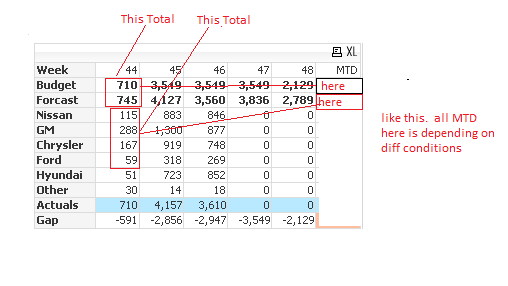
Like this
- Mark as New
- Bookmark
- Subscribe
- Mute
- Subscribe to RSS Feed
- Permalink
- Report Inappropriate Content
If this type of conditions will be applied, so I think you will be having multiple MTD column,
as you want to sum up Budget and Forecast for week 44,
and others also...
I think it would not be possible.
One solution can be , you can use text boxes for showing specific totals.
- « Previous Replies
-
- 1
- 2
- Next Replies »