Unlock a world of possibilities! Login now and discover the exclusive benefits awaiting you.

- Qlik Community
- :
- All Forums
- :
- QlikView
- :
- Re: Rowno() count
- Subscribe to RSS Feed
- Mark Topic as New
- Mark Topic as Read
- Float this Topic for Current User
- Bookmark
- Subscribe
- Mute
- Printer Friendly Page

 qlikview979
- Mark as New
- Bookmark
- Subscribe
- Mute
- Subscribe to RSS Feed
- Permalink
- Report Inappropriate Content
Rowno() count
Hi Experts,
PFA,
Here i want exclude the blanks count .
| Partner_Name | Inward_no &' -- '&RowNo() |
| A | 16MS2ADHC7838 -- 1 |
| B | 16MS3SOS34969 -- 2 |
| C | 16MS3SOS36890 -- 3 |
| D | -- 4 |
| E | -- 5 |
| F | 16MS3SOS48772 -- 6 |
| G | 16MS3TRB37584 -- 7 |
| H | 16MS3TRB40266 -- 8 |
| I | 16MS4ADHC6867 -- 9 |
| J | 16MS4ADHC6902 -- 10 |
| K | 16MS4ADHC6951 -- 11 |
| L | 16MS4ADHC7835 -- 12 |
| M | 16MS4ADHC7842 -- 13 |
| N | 16MS4DEM48171 -- 14 |
| O | 16MS4PPNC7830 -- 15 |
| P | 16MS4SOS40478 -- 16 |
| Q | 16MS4SOS40871 -- 17 |
| R | 16MS4SOS43214 -- 18 |
| S | -- 19 |
| T | -- 20 |
| U | -- 21 |
| V | -- 22 |
| W | 16MS4SOS46341 -- 23 |
| X | 16MS4SOS46500 -- 24 |
| Y | 16MS4SOS46501 -- 25 |
| Z | 16MS4SOS46502 -- 26 |
Expected output:-
| Partner_Name | Inward_no &' -- '&RowNo() |
| A | 16MS2ADHC7838 -- 1 |
| B | 16MS3SOS34969 -- 2 |
| C | 16MS3SOS36890 -- 3 |
| D | |
| E | |
| F | 16MS3SOS48772 -- 4 |
| G | 16MS3TRB37584 -- 5 |
| H | 16MS3TRB40266 -- 6 |
| I | 16MS4ADHC6867 -- 7 |
| J | 16MS4ADHC6902 -- 8 |
| K | 16MS4ADHC6951 -- 9 |
| L | 16MS4ADHC7835 -- 10 |
| M | 16MS4ADHC7842 -- 11 |
| N | 16MS4DEM48171 -- 12 |
| O | 16MS4PPNC7830 -- 13 |
| P | 16MS4SOS40478 -- 14 |
| Q | 16MS4SOS40871 -- 15 |
| R | 16MS4SOS43214 -- 16 |
| S | |
| T | |
| U | |
| V | |
| W | 16MS4SOS46341 -- 17 |
| X | 16MS4SOS46500 -- 18 |
| Y | 16MS4SOS46501 -- 19 |
| Z | 16MS4SOS46502 -- 20 |
Regards
Mahesh

- Mark as New
- Bookmark
- Subscribe
- Mute
- Subscribe to RSS Feed
- Permalink
- Report Inappropriate Content
Front end doesn't have this feature. Why you want in Front end only rather we have in script
qlikview979
- Mark as New
- Bookmark
- Subscribe
- Mute
- Subscribe to RSS Feed
- Permalink
- Report Inappropriate Content
Hi Brother,
Just now i attached original files please look at that
Regards
qlikview979
- Mark as New
- Bookmark
- Subscribe
- Mute
- Subscribe to RSS Feed
- Permalink
- Report Inappropriate Content
Hi Anil,
Please look at my recent attached original files
Regards
 prat1507
- Mark as New
- Bookmark
- Subscribe
- Mute
- Subscribe to RSS Feed
- Permalink
- Report Inappropriate Content
Hi Mahesh
Can you plz be a little clear as to what you desire for.
Regards
Pratyush
- Mark as New
- Bookmark
- Subscribe
- Mute
- Subscribe to RSS Feed
- Permalink
- Report Inappropriate Content
I don't see any change in your original reply. Do you have license, If so open my file and see how it works
qlikview979
- Mark as New
- Bookmark
- Subscribe
- Mute
- Subscribe to RSS Feed
- Permalink
- Report Inappropriate Content
Hi
In my attachment "Serial" column data like T-FPA-1/10 ------ T-FPA-23/10
Here rowno() calculating the blank rows also in this column, but i don't want to calculate Blank in Serial column data like below
T-FPA-1/10 ------ T-FPA-10/10
Regards
qlikview979
- Mark as New
- Bookmark
- Subscribe
- Mute
- Subscribe to RSS Feed
- Permalink
- Report Inappropriate Content
Hi Anil
In my attachment "Serial" column data like T-FPA-1/10 ------ T-FPA-23/10
Here rowno() calculating the blank rows also in this column, but i don't want to calculate Blank in Serial column data like below
T-FPA-1/10 ------ T-FPA-10/10
Regards

 avinashelite
- Mark as New
- Bookmark
- Subscribe
- Mute
- Subscribe to RSS Feed
- Permalink
- Report Inappropriate Content
I don't see any null values in your data for Serial , VIN number etc ...
what is the output your excepting ??
.png "sasikanth")
 sasikanth
- Mark as New
- Bookmark
- Subscribe
- Mute
- Subscribe to RSS Feed
- Permalink
- Report Inappropriate Content
HI Mahesh
Please check the below change in SERIAL exp
if(aggr(Sum({<[VIN Number]=>}[Gross Amount]),[Partner Name])-aggr(Sum({<[VIN Number]=>}Deduction),[Partner Name])>0,
Serials&'-'& aggr(RowNo(TOTAL),[Partner Name]) &'\'&count( DISTINCT TOTAL [Partner Name]))
and in sort tab for Partner name use exp sort ascending
=Serials&'-'&RowNo().
PFA for reference
- Mark as New
- Bookmark
- Subscribe
- Mute
- Subscribe to RSS Feed
- Permalink
- Report Inappropriate Content
Bro,
He is expecting similar which we did earlier. But he is looking in Front end. Can you see his report while you open the qvw. There you will get serial as expression. From that he want to apply this condition Autonumber(). But, as i aware we don't have option called Autonumber() on front end. He is expecting seq. numbers value for it like 4,5,6,7,...
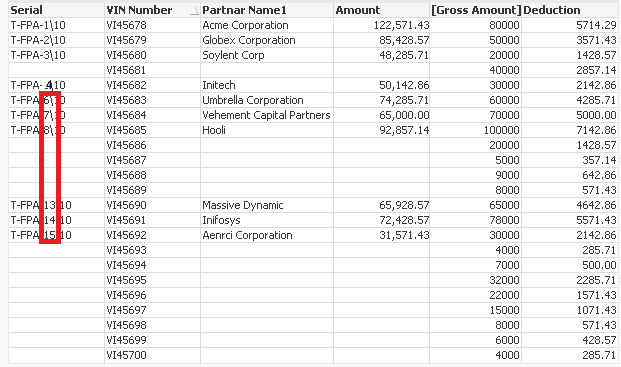
I have notice, Here we require aggr for that
if(aggr(Sum({<[VIN Number]=>}[Gross Amount]),[Partner Name])-aggr(Sum({<[VIN Number]=>}Deduction),[Partner Name])>0,
Serials&'-'& Aggr(RowNo(TOTAL), [Partner Name])&'\'&count( DISTINCT TOTAL [Partner Name]))
