Unlock a world of possibilities! Login now and discover the exclusive benefits awaiting you.

Announcements
Share your agentic AI experience, learn from others, and earn a new badge: Put Agentic AI to Work
- Qlik Community
- :
- All Forums
- :
- QlikView
- :
- Running Total not working
Options
- Subscribe to RSS Feed
- Mark Topic as New
- Mark Topic as Read
- Float this Topic for Current User
- Bookmark
- Subscribe
- Mute
- Printer Friendly Page
Turn on suggestions
Auto-suggest helps you quickly narrow down your search results by suggesting possible matches as you type.
Showing results for

 ajaymehtaece
Contributor
2019-04-05
08:14 AM
- Mark as New
- Bookmark
- Subscribe
- Mute
- Subscribe to RSS Feed
- Permalink
- Report Inappropriate Content
Running Total not working
Hello everyone,
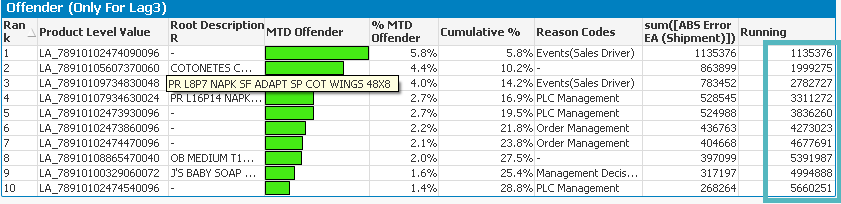
I am trying to calculate running total in the last column using formulae(Aggr(RangeSum (above(sum([ABS Error EA (Shipment)]),0,RowNo())),[Product Level Value])
But unfortunately its throwing some garbage value in few of the rows. Kindly suggest me the proper solution.I am trying from long time but not getting the solution.
Thanks in advance.
931 Views
1 Solution
Accepted Solutions

 sunny_talwar
MVP
2019-04-05
08:29 AM
- Mark as New
- Bookmark
- Subscribe
- Mute
- Subscribe to RSS Feed
- Permalink
- Report Inappropriate Content
How about if you try this
RangeSum(Above(TOTAL Sum([ABS Error EA (Shipment)]), 0, RowNo(TOTAL)))
923 Views
1 Reply
sunny_talwar
MVP
2019-04-05
08:29 AM
- Mark as New
- Bookmark
- Subscribe
- Mute
- Subscribe to RSS Feed
- Permalink
- Report Inappropriate Content
How about if you try this
RangeSum(Above(TOTAL Sum([ABS Error EA (Shipment)]), 0, RowNo(TOTAL)))
924 Views
