Unlock a world of possibilities! Login now and discover the exclusive benefits awaiting you.

- Qlik Community
- :
- All Forums
- :
- QlikView
- :
- Re: SUM + IF
- Subscribe to RSS Feed
- Mark Topic as New
- Mark Topic as Read
- Float this Topic for Current User
- Bookmark
- Subscribe
- Mute
- Printer Friendly Page

 catunoho
- Mark as New
- Bookmark
- Subscribe
- Mute
- Subscribe to RSS Feed
- Permalink
- Report Inappropriate Content
SUM + IF
Hello all,
have a big problem with calculating a percentage of the two marked columns. I would like to show the percentage in a Text Box but since the column on the right side is calculate with an if clause, QlikView won't let me do this.
The column "Zielererichung" looks as follows:
if((sum(tt_rueck) / sum(TKE_Wert)) >= 1, sum(tt_anwesend), 0)
Column "Anwesend" is just: sum(tt_anwesend)
If I create a text box and try to calculate the percentage:
=num(100 / (sum(if((sum(tt_rueck) / sum(TKE_Wert)) >= 1, sum(tt_anwesend), 0))) / sum(tt_anwesend))
I get the message:
Error: nested aggregation not allowed
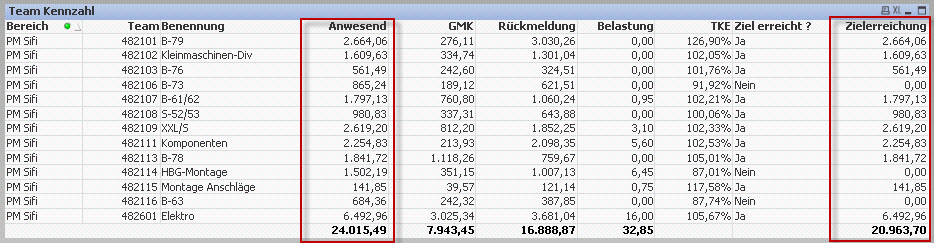
I can not get the total fro "Zielerreichung" from the script, the result does not match with what I get in the chart
any idea's
Thanks
Stefan
Accepted Solutions

 simondachstr
- Mark as New
- Bookmark
- Subscribe
- Mute
- Subscribe to RSS Feed
- Permalink
- Report Inappropriate Content
Can you validate the below formula in a text box.
=num((sum(aggr(if((sum(tt_rueck) / sum(TKE_Wert)) >= 1, sum(tt_anwesend), 0), Bereich, Team, Benennung)) / sum(total tt_anwesend)),'#.##0%')

- Mark as New
- Bookmark
- Subscribe
- Mute
- Subscribe to RSS Feed
- Permalink
- Report Inappropriate Content
You can maybe try:
= Num(100/ Sum(if(Sum(tt_reck)/sum(TKE_Wert) >=1, tt_anwesend,0)) / Sum(tt_anwesend) )
CAn you attach a sample file if it doens't work.
Thanks
catunoho
- Mark as New
- Bookmark
- Subscribe
- Mute
- Subscribe to RSS Feed
- Permalink
- Report Inappropriate Content
Sorry did not help. Here is the sample file... hope the german description are not a problem
 jagan
jagan
- Mark as New
- Bookmark
- Subscribe
- Mute
- Subscribe to RSS Feed
- Permalink
- Report Inappropriate Content
Hi Stefan,
Try like this
LOAD
*,
if((sum(tt_rueck) / sum(TKE_Wert)) >= 1, tt_anwesend, 0) AS Zielerreichung
FROM DataSource;
Now in chart you directly use =Sum(Zielerreichung) and check whether values are correct.
Hope this helps you.
Regards,
Jagan.
simondachstr
- Mark as New
- Bookmark
- Subscribe
- Mute
- Subscribe to RSS Feed
- Permalink
- Report Inappropriate Content
Can you validate the below formula in a text box.
=num((sum(aggr(if((sum(tt_rueck) / sum(TKE_Wert)) >= 1, sum(tt_anwesend), 0), Bereich, Team, Benennung)) / sum(total tt_anwesend)),'#.##0%')
catunoho
- Mark as New
- Bookmark
- Subscribe
- Mute
- Subscribe to RSS Feed
- Permalink
- Report Inappropriate Content
Hi Jagan,
tried this before but I get different (wrong) values if I use the if clause in the script.
Regards
Stefan
catunoho
- Mark as New
- Bookmark
- Subscribe
- Mute
- Subscribe to RSS Feed
- Permalink
- Report Inappropriate Content
Hello Martin,
that's it...works perfect !!! Thanks a lot