Unlock a world of possibilities! Login now and discover the exclusive benefits awaiting you.

- Qlik Community
- :
- All Forums
- :
- QlikView
- :
- Sales %age
- Subscribe to RSS Feed
- Mark Topic as New
- Mark Topic as Read
- Float this Topic for Current User
- Bookmark
- Subscribe
- Mute
- Printer Friendly Page

- Mark as New
- Bookmark
- Subscribe
- Mute
- Subscribe to RSS Feed
- Permalink
- Report Inappropriate Content
Sales %age
Hello Everyone
Can you please help me , how to find out Regional Sales %age compare to Total Sales
Region Sales Regional Sales%age
A 1000 Need a fromula here
B 1500 "
C 2000 "
Total 4500
Sale
Highly Appreciate for answers
Regards
- Tags:
- new_to_qlikview

 rubenmarin
- Mark as New
- Bookmark
- Subscribe
- Mute
- Subscribe to RSS Feed
- Permalink
- Report Inappropriate Content
Hi Asim, try with:
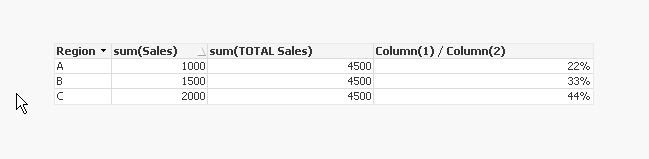
Sum(Sales)/Sum(TOTAL Sales)
"TOTAL" tells QlikView to consider all the values selected, ignoring table dimensions, so each row divides the value of that region to the sales of all regions.
In the 'Numbers' tab of the chart select one of the numeric options (integer, fixed decimal...) and check the option to show in percentage.
- Mark as New
- Bookmark
- Subscribe
- Mute
- Subscribe to RSS Feed
- Permalink
- Report Inappropriate Content
Thanks, That worked perfect
 maxgro
- Mark as New
- Bookmark
- Subscribe
- Mute
- Subscribe to RSS Feed
- Permalink
- Report Inappropriate Content
maxgro
- Mark as New
- Bookmark
- Subscribe
- Mute
- Subscribe to RSS Feed
- Permalink
- Report Inappropriate Content
please marks Ruben answer correct and close the thread, thanks