Unlock a world of possibilities! Login now and discover the exclusive benefits awaiting you.

Announcements
Q&A with Qlik - Qlik Cloud Migration: Questions about migrating to Qlik Cloud? Catch the latest replay!
- Qlik Community
- :
- All Forums
- :
- QlikView
- :
- Scheduled biweekly reload for QV Management Consol...
Options
- Subscribe to RSS Feed
- Mark Topic as New
- Mark Topic as Read
- Float this Topic for Current User
- Bookmark
- Subscribe
- Mute
- Printer Friendly Page
Turn on suggestions
Auto-suggest helps you quickly narrow down your search results by suggesting possible matches as you type.
Showing results for

Anonymous
Not applicable
2017-02-08
09:39 PM
- Mark as New
- Bookmark
- Subscribe
- Mute
- Subscribe to RSS Feed
- Permalink
- Report Inappropriate Content
Scheduled biweekly reload for QV Management Console
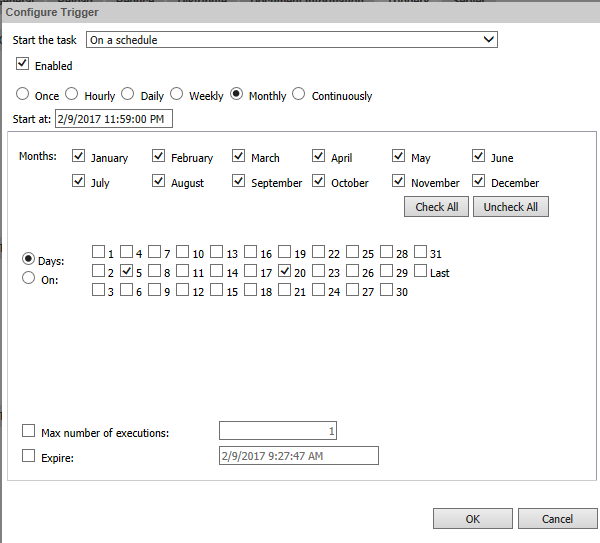
Is it possible and how can I schedule a biweekly (twice a month) reload to update the data of the QlikView Reports / Dashboard using QlikView Enterprise Management Console e.g on 2359 h of every month's
1. 20th
2. 5th
I read on Qlik Server Manual by default only once monthly.
Monthly
Select the number of day of every month (having that number of day), for the reload function to start, in the drop-down list:
- 1, 2, 3... 31, and Last Day, where each value represents that day of every months.
Also, enter the time for the reload function to start, in this text box, by using the following format: hh:mm.
Thanks for the help.
1,068 Views
3 Replies

 mmpas4887
Contributor III
2017-02-09
12:30 PM
- Mark as New
- Bookmark
- Subscribe
- Mute
- Subscribe to RSS Feed
- Permalink
- Report Inappropriate Content
Would this work?

 Gysbert_Wassena
Partner - Champion III
2017-02-09
12:41 PM
- Mark as New
- Bookmark
- Subscribe
- Mute
- Subscribe to RSS Feed
- Permalink
- Report Inappropriate Content
If you don't have Publisher you can try mounting the folder with the document twice and add a reload task to each instance of the document in the mounted folders.
talk is cheap, supply exceeds demand
Anonymous
Not applicable
2017-02-13
10:21 PM
Author
- Mark as New
- Bookmark
- Subscribe
- Mute
- Subscribe to RSS Feed
- Permalink
- Report Inappropriate Content
Thanks guys, i will try one of these solution. I do not have a Publisher.
950 Views