Unlock a world of possibilities! Login now and discover the exclusive benefits awaiting you.

Announcements
Talend Cloud AWS EU Scheduled Outage: Starting Tues 26 May 21:00 CEST with expected completion Wed 27 May 01:00 CEST
- Qlik Community
- :
- All Forums
- :
- QlikView
- :
- Separate numbers with quotes (number formatting)
Options
- Subscribe to RSS Feed
- Mark Topic as New
- Mark Topic as Read
- Float this Topic for Current User
- Bookmark
- Subscribe
- Mute
- Printer Friendly Page
Turn on suggestions
Auto-suggest helps you quickly narrow down your search results by suggesting possible matches as you type.
Showing results for

Not applicable
2012-06-04
05:27 PM
- Mark as New
- Bookmark
- Subscribe
- Mute
- Subscribe to RSS Feed
- Permalink
- Report Inappropriate Content
Separate numbers with quotes (number formatting)
Hello,
I would like to display the numbers like this:
1000 ==> 1'000
11'000 ==> 11'000
1000000 ==> 1'000'000
I've tried with the num function but without success. Can anyone help me ? Thanks!
621 Views
1 Solution
Accepted Solutions
Not applicable
2012-06-05
06:57 PM
Author
- Mark as New
- Bookmark
- Subscribe
- Mute
- Subscribe to RSS Feed
- Permalink
- Report Inappropriate Content
=num(1000000000, '#'&chr(39)&'###.00','.' , chr(39))
Result: 100'00'00'000.00
398 Views
2 Replies

 Sokkorn
Master
2012-06-04
11:30 PM
- Mark as New
- Bookmark
- Subscribe
- Mute
- Subscribe to RSS Feed
- Permalink
- Report Inappropriate Content
Hi,
For me, first we need to formate number into 1,000,000.00 then replace <,> to <'>. Somthing like this =REPLACE(NUM('1000000','###,###.#0'),',',CHR(39))
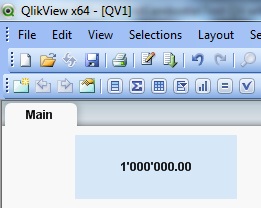
Regards,
Sokkorn
398 Views
Not applicable
2012-06-05
06:57 PM
Author
- Mark as New
- Bookmark
- Subscribe
- Mute
- Subscribe to RSS Feed
- Permalink
- Report Inappropriate Content
=num(1000000000, '#'&chr(39)&'###.00','.' , chr(39))
Result: 100'00'00'000.00
399 Views