Unlock a world of possibilities! Login now and discover the exclusive benefits awaiting you.

- Qlik Community
- :
- All Forums
- :
- QlikView
- :
- Session Duration
Options
- Subscribe to RSS Feed
- Mark Topic as New
- Mark Topic as Read
- Float this Topic for Current User
- Bookmark
- Subscribe
- Mute
- Printer Friendly Page
Turn on suggestions
Auto-suggest helps you quickly narrow down your search results by suggesting possible matches as you type.
Showing results for

Anonymous
Not applicable
2017-01-20
11:11 AM
- Mark as New
- Bookmark
- Subscribe
- Mute
- Subscribe to RSS Feed
- Permalink
- Report Inappropriate Content
Session Duration
Hi,.
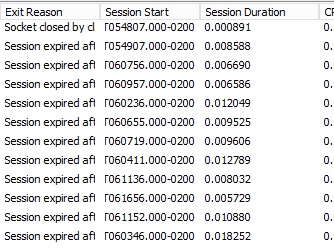
In qlikview 12, the session.log change format Session Duration... before was HH:MM:SS and now come someting like this:]
0.000087
0.000313
Anyone know who parse this number to format HH:MM:SS?
- Tags:
- qlikview_scripting
1,420 Views
4 Replies

2017-01-20
11:16 AM
- Mark as New
- Bookmark
- Subscribe
- Mute
- Subscribe to RSS Feed
- Permalink
- Report Inappropriate Content
May be try
Date(Timestamp([Session Duration]),'HH:MM:SS')
Best Anil, When applicable please mark the correct/appropriate replies as "solution" (you can mark up to 3 "solutions". Please LIKE threads if the provided solution is helpful
1,180 Views
Anonymous
Not applicable
2017-01-20
11:22 AM
Author
- Mark as New
- Bookmark
- Subscribe
- Mute
- Subscribe to RSS Feed
- Permalink
- Report Inappropriate Content
I try this before, but Timestamp not work...=/
But thanks anyway...
1,180 Views
2017-01-20
11:32 AM
- Mark as New
- Bookmark
- Subscribe
- Mute
- Subscribe to RSS Feed
- Permalink
- Report Inappropriate Content
Can you send the Data? Not the image then i will try
Best Anil, When applicable please mark the correct/appropriate replies as "solution" (you can mark up to 3 "solutions". Please LIKE threads if the provided solution is helpful
1,180 Views

 rwunderlich
MVP
2017-01-20
12:45 PM
- Mark as New
- Bookmark
- Subscribe
- Mute
- Subscribe to RSS Feed
- Permalink
- Report Inappropriate Content
It's already a QV time value -- fraction of a day. If you want to display it as hh:mm:ss use:
=interval(0.002963, 'hh:mm:ss')
-Rob
1,180 Views