Unlock a world of possibilities! Login now and discover the exclusive benefits awaiting you.

- Qlik Community
- :
- All Forums
- :
- QlikView
- :
- Re: Set Analysis Greater than variable from row
- Subscribe to RSS Feed
- Mark Topic as New
- Mark Topic as Read
- Float this Topic for Current User
- Bookmark
- Subscribe
- Mute
- Printer Friendly Page

 LucasD
- Mark as New
- Bookmark
- Subscribe
- Mute
- Subscribe to RSS Feed
- Permalink
- Report Inappropriate Content
Set Analysis Greater than variable from row
Hello Everyone,
What I am trying to achieve seems very easy, but I am facing some troubles.
I Have basically 3 dimensions:
Phase.NUM= Is a number (yyyymm),
Ciclo = Cycle (number) (myyyy),
NewCiclo = Cycle as text (mm yyyy),
I am trying to get a table with the Sum of a "Total" only if my "Phase.NUM" is greater than my "NewCiclo", which need to be adjusted to the same format as Phase. Additionally, I have a filter applied on this page for Cycle Field that should be ignored for this table.
I could achieve partially with the code bellow, however, its not dynamically calculating based on every row of my table.
The part {">$(=Right(NewCiclo,4)&Left(NewCiclo,2))"} is bringing a fixed value following the filter selected not the "NewCiclo" value from each row.
Code:
SUM( {1}
aggr({1}
sum({$<[Phase.NUM]={">$(=Right(NewCiclo,4)&Left(NewCiclo,2))"}, Ciclo >}Total)
material, Ciclo
)
)
The expected result should be something like this:
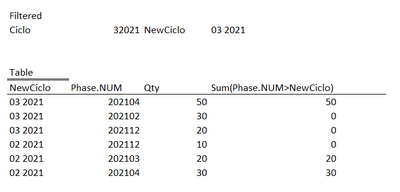
Aggregating without "Phase.NUM" should get this:

Thanks in advance!
Accepted Solutions

 rwunderlich
- Mark as New
- Bookmark
- Subscribe
- Mute
- Subscribe to RSS Feed
- Permalink
- Report Inappropriate Content
You cannot create a set using row values. The set is calculated once for the chart. To do row by row processing you must use if(). In your case:
sum({$<[Ciclo= >}if([Phase.NUM] > Right(NewCiclo,4)& Left(NewCiclo,2), Total))
-Rob
http://masterssummit.com
http://qlikviewcookbook.com
http://www.easyqlik.com
rwunderlich
- Mark as New
- Bookmark
- Subscribe
- Mute
- Subscribe to RSS Feed
- Permalink
- Report Inappropriate Content
You cannot create a set using row values. The set is calculated once for the chart. To do row by row processing you must use if(). In your case:
sum({$<[Ciclo= >}if([Phase.NUM] > Right(NewCiclo,4)& Left(NewCiclo,2), Total))
-Rob
http://masterssummit.com
http://qlikviewcookbook.com
http://www.easyqlik.com
LucasD
- Mark as New
- Bookmark
- Subscribe
- Mute
- Subscribe to RSS Feed
- Permalink
- Report Inappropriate Content
Thanks a lot, it worked!!!
Another tricky question... I need to do the same for the same row, based on a value from other row just like the table below.
I tried analogous with the previous solution, but no success.
(sum({$<Ciclo={'Actual'}>} if([Phase.NUM] >= Right(NewCiclo,4)& Left(NewCiclo,2), Total) + Sum({1} 0)))
What is getting complex, I guess, is that for this code the Phase.NUM parameter that I need is from rows which "NewCiclo = Actual" and the NewCiclo parameter is from the current row, I'm mixing up the things a little bit.
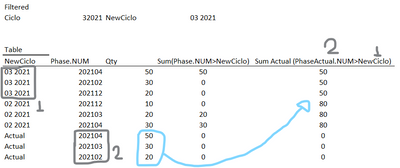
The idea afterwards is to achieve this:

rwunderlich
- Mark as New
- Bookmark
- Subscribe
- Mute
- Subscribe to RSS Feed
- Permalink
- Report Inappropriate Content
You'll need to use the TOTAL modifier to reference rows "outside your dimension"
-Rob
