Unlock a world of possibilities! Login now and discover the exclusive benefits awaiting you.

- Qlik Community
- :
- All Forums
- :
- QlikView
- :
- Set Analysis with Function and Variable
- Subscribe to RSS Feed
- Mark Topic as New
- Mark Topic as Read
- Float this Topic for Current User
- Bookmark
- Subscribe
- Mute
- Printer Friendly Page

- Mark as New
- Bookmark
- Subscribe
- Mute
- Subscribe to RSS Feed
- Permalink
- Report Inappropriate Content
Set Analysis with Function and Variable
Hello Community, I have a doubt about if it is possible create a set analysis working with function and variable at the same time.
I want to do something like this:
sum({<monthname(DateTn)={$(vMonth)}>} Amount)
Thanks for your responses.
Accepted Solutions

 Clever_Anjos
- Mark as New
- Bookmark
- Subscribe
- Mute
- Subscribe to RSS Feed
- Permalink
- Report Inappropriate Content
Clever_Anjos
- Mark as New
- Bookmark
- Subscribe
- Mute
- Subscribe to RSS Feed
- Permalink
- Report Inappropriate Content
You have to use a field on left side, but you can use a variable on right side


- Mark as New
- Bookmark
- Subscribe
- Mute
- Subscribe to RSS Feed
- Permalink
- Report Inappropriate Content
The above statement wont work.
You have to use Dimensions.
But, we can rewrite as below..
sum({<Dim1={DimValues}>} If(MonthName(DateTn)=$(vMonth), Amount))
- Mark as New
- Bookmark
- Subscribe
- Mute
- Subscribe to RSS Feed
- Permalink
- Report Inappropriate Content
I created a column with the monthname of the date, and in the set analysis I compare as the following expression:
sum({<Mes_Txn={$(vMonthA)}>}Amount)
But the issue continues. vMonthA= Feb 2016 (for example)
Thanks
Clever_Anjos
- Mark as New
- Bookmark
- Subscribe
- Mute
- Subscribe to RSS Feed
- Permalink
- Report Inappropriate Content
Please check if this works
sum({<Mes_Txn={"$(=vMonthA)"}>}Amount)
Clever_Anjos
- Mark as New
- Bookmark
- Subscribe
- Mute
- Subscribe to RSS Feed
- Permalink
- Report Inappropriate Content
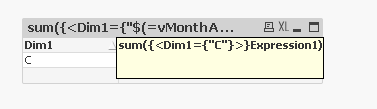
Anyway add your expression to a Straight Table with no label for your dimension
Mouse over your column and see how your variable is beeing evaluated
Clever_Anjos
- Mark as New
- Bookmark
- Subscribe
- Mute
- Subscribe to RSS Feed
- Permalink
- Report Inappropriate Content
- Mark as New
- Bookmark
- Subscribe
- Mute
- Subscribe to RSS Feed
- Permalink
- Report Inappropriate Content
Thanks. That works very good!!!