Unlock a world of possibilities! Login now and discover the exclusive benefits awaiting you.

- Qlik Community
- :
- All Forums
- :
- QlikView
- :
- Set analysis with multiple set modifiers with aggr...
- Subscribe to RSS Feed
- Mark Topic as New
- Mark Topic as Read
- Float this Topic for Current User
- Bookmark
- Subscribe
- Mute
- Printer Friendly Page

- Mark as New
- Bookmark
- Subscribe
- Mute
- Subscribe to RSS Feed
- Permalink
- Report Inappropriate Content
Set analysis with multiple set modifiers with aggregation functions: {"=sum(x)>N"}
Dear fellow QV enthusiasts.
I need to add two conditions to set analysis that will work as AND:
1. Show only [Material Groups] that have > 1 order types
2. Show only [Order types] that have > 3 orders
The original table is like this, without filtering:
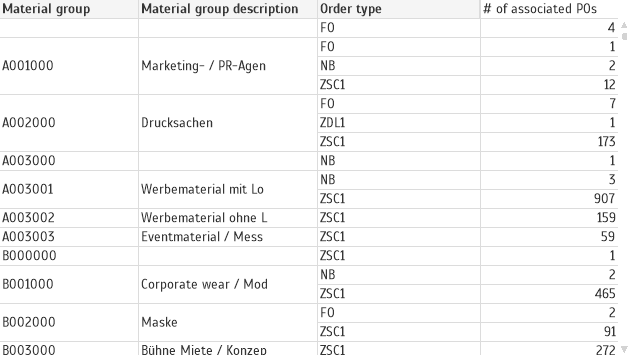
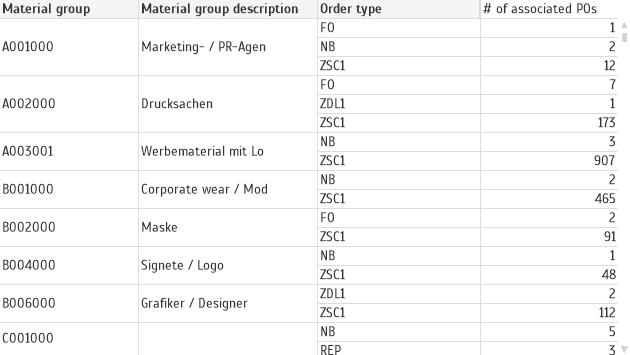
I can use set analysis in the expression for [# of associated POs] to get [Material Groups] that have > 1 order types.
=count(
{$
<
[Material Group] = {"=count(distinct [Order Type]) > 1"}
>
} distinct [Order Nr])
It works:
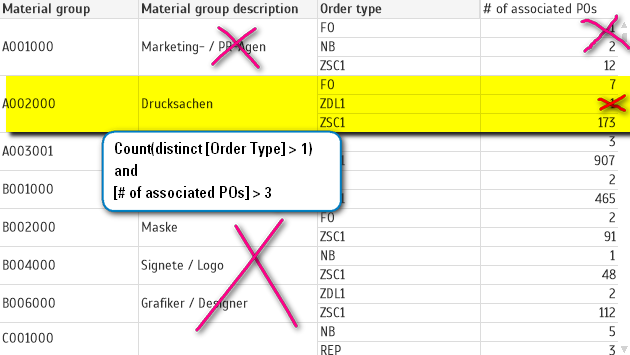
Now I need to get something like this, to show only [Order types] = F0 and ZSC1 and only [Material Group] = A002000:
I tried this:
=count(
{$
<
[Material Group] = {"=count(distinct [Order Type]) > 1"}
*
{"=count(distinct [Order Nr]) > 3"}
>
}
distinct [Order Nr])
or this:
=count(
{$
<
[Material Group] = {"=count(distinct [Order Type]) > 1"}
*
{"=count(distinct total <[Material Group],[Order Type]> [Order Nr]) > 3"}
>
}
distinct [Order Nr])
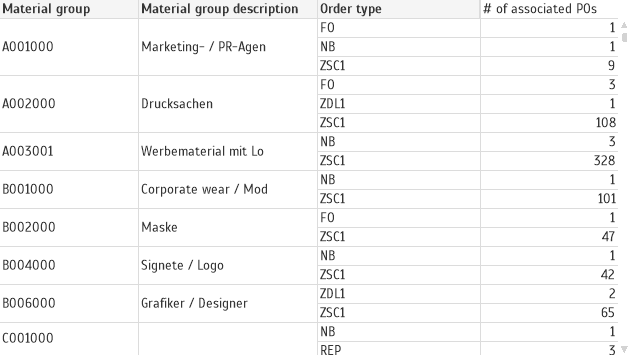
And it is not filtering:
- « Previous Replies
-
- 1
- 2
- Next Replies »
- Mark as New
- Bookmark
- Subscribe
- Mute
- Subscribe to RSS Feed
- Permalink
- Report Inappropriate Content
I have provided a sample file, which can be used to reproduce the logic that I described above. It think the exact row count does not matter if we need to prove the concept.
In the attached dataset, I have 2 material groups, each containing 3 order types. One of the 2 material groups fulfills the set analysis criteria: it has more than 1 order types and >=3 orders in at least 2 order types. So, I'm sure this dataset is enough to illustrate the case. Just looking for the formula.

 ramoncova06
- Mark as New
- Bookmark
- Subscribe
- Mute
- Subscribe to RSS Feed
- Permalink
- Report Inappropriate Content
the issue is that we are using advance search to get the order type, and because in the material group A002000 it does have 3 entries it is included as a valid group for each material group
this is one option, is not clean, but will get you out of the problem
if(count(
{
<[Order Type]= {"=count(distinct total <[Material Group],[Order Type],[Order Nr]> [Order Nr]) >= 3"}>
*
<[Material Group] = {"=count(distinct [Order Type]) > 1"}>
}
distinct [Order Nr]) < 3, 0,count(
{
<[Order Type]= {"=count(distinct total <[Material Group],[Order Type],[Order Nr]> [Order Nr]) >= 3"}>
*
<[Material Group] = {"=count(distinct [Order Type]) > 1"}>
}
distinct [Order Nr]))
ramoncova06
- Mark as New
- Bookmark
- Subscribe
- Mute
- Subscribe to RSS Feed
- Permalink
- Report Inappropriate Content
here is another option
if(count(distinct total <[Material Group],[Order Type],[Order Nr]> [Order Nr]) >= 3
and count([Order Type]) > 1,
count(distinct([Order Nr])),0
)
- « Previous Replies
-
- 1
- 2
- Next Replies »