Unlock a world of possibilities! Login now and discover the exclusive benefits awaiting you.

- Qlik Community
- :
- All Forums
- :
- QlikView
- :
- Set different "Sort by" for drill down chart
- Subscribe to RSS Feed
- Mark Topic as New
- Mark Topic as Read
- Float this Topic for Current User
- Bookmark
- Subscribe
- Mute
- Printer Friendly Page

- Mark as New
- Bookmark
- Subscribe
- Mute
- Subscribe to RSS Feed
- Permalink
- Report Inappropriate Content
Set different "Sort by" for drill down chart
Hi guys,
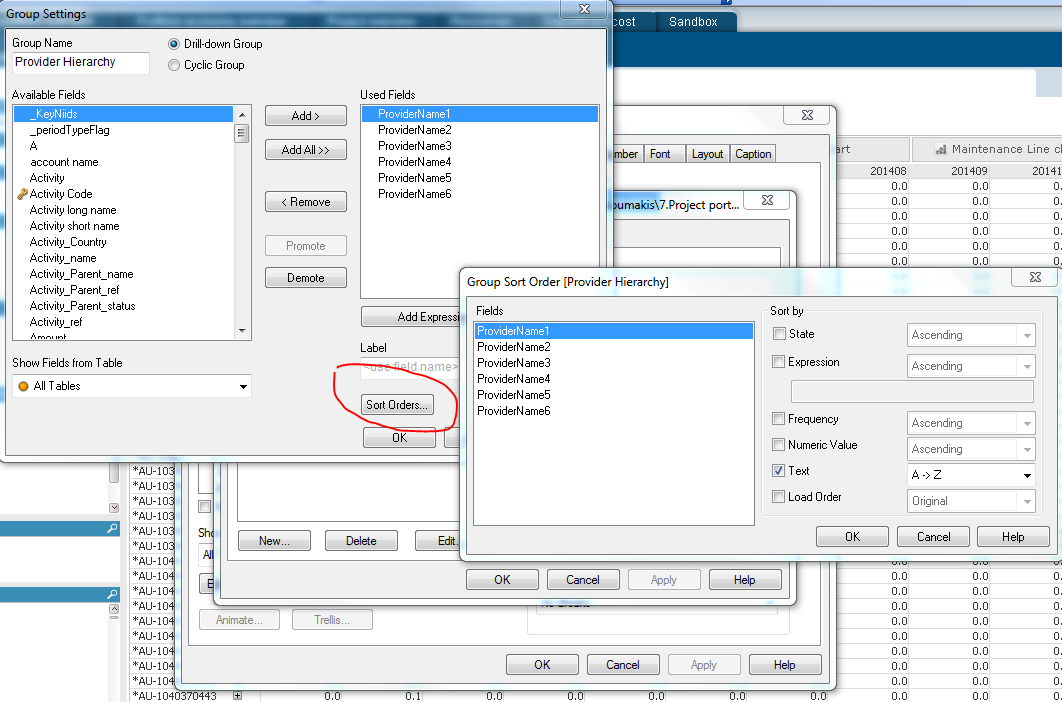
Can I set different "sort by"s for different layers in a drill down chart?
For example,
I have a drill down group with four layers as a dimension.
1. Year
2. Agent
3. Order Number
The express is: sum(sales)
Of course I want the "Year" to be in acceding order. But I want the "Agent" and "Order Number" to be in descending order by "Y value" which is the sum of the sales.
How can I achieve this?
Thanks,
Lynn
Accepted Solutions

 giakoum
- Mark as New
- Bookmark
- Subscribe
- Mute
- Subscribe to RSS Feed
- Permalink
- Report Inappropriate Content
true, but you can use expression instead. The Y value is actually your 1st expression in the table, so you can replicate it here.
giakoum
- Mark as New
- Bookmark
- Subscribe
- Mute
- Subscribe to RSS Feed
- Permalink
- Report Inappropriate Content
- Mark as New
- Bookmark
- Subscribe
- Mute
- Subscribe to RSS Feed
- Permalink
- Report Inappropriate Content
Thanks, but there is no option for "Y value" descending....
giakoum
- Mark as New
- Bookmark
- Subscribe
- Mute
- Subscribe to RSS Feed
- Permalink
- Report Inappropriate Content
true, but you can use expression instead. The Y value is actually your 1st expression in the table, so you can replicate it here.

.png "Former Employee") JonnyPoole
JonnyPoole
- Mark as New
- Bookmark
- Subscribe
- Mute
- Subscribe to RSS Feed
- Permalink
- Report Inappropriate Content
For the levels you need 'Y Value descending' , select expression and enter your expression sum(Sales) again . Descending.
- Mark as New
- Bookmark
- Subscribe
- Mute
- Subscribe to RSS Feed
- Permalink
- Report Inappropriate Content
Great!! It works. You are awesome!