Unlock a world of possibilities! Login now and discover the exclusive benefits awaiting you.

- Qlik Community
- :
- All Forums
- :
- QlikView
- :
- Show Excel File In QLikview
Options
- Subscribe to RSS Feed
- Mark Topic as New
- Mark Topic as Read
- Float this Topic for Current User
- Bookmark
- Subscribe
- Mute
- Printer Friendly Page
Turn on suggestions
Auto-suggest helps you quickly narrow down your search results by suggesting possible matches as you type.
Showing results for

Not applicable
2015-08-26
01:04 AM
- Mark as New
- Bookmark
- Subscribe
- Mute
- Subscribe to RSS Feed
- Permalink
- Report Inappropriate Content
Show Excel File In QLikview
hello dears
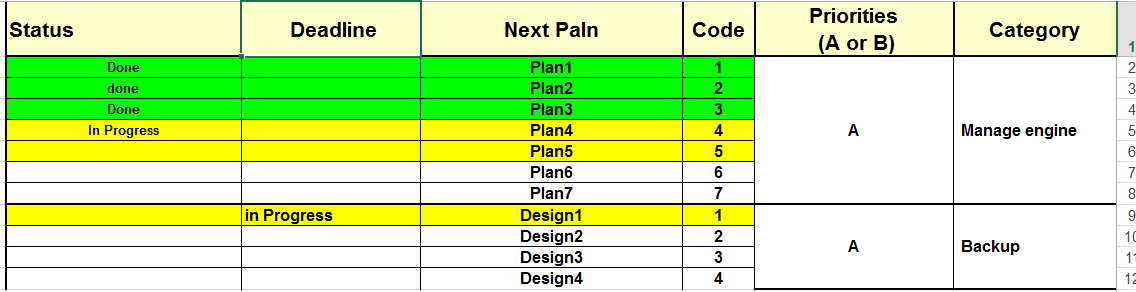
i want show this file in qlikview
Look like Excel File (Style,Sort,Group,Status Done=Green And InProgres = Yellow,...)
Plz Help me
excel file is attachment
1,277 Views
3 Replies

 krishna20
Specialist II
2015-08-26
01:47 AM
- Mark as New
- Bookmark
- Subscribe
- Mute
- Subscribe to RSS Feed
- Permalink
- Report Inappropriate Content
Hi,
try this.
Choose Pivot table and in Status dimension. Expand the dimension choose background then type below expression.
if(Status='Done',Green(),Yellow())
1,067 Views
Not applicable
2015-08-26
01:53 AM
Author
- Mark as New
- Bookmark
- Subscribe
- Mute
- Subscribe to RSS Feed
- Permalink
- Report Inappropriate Content
Import File Look Like Excel File
1,067 Views

 Kushal_Chawda
MVP
2015-08-26
02:49 AM
- Mark as New
- Bookmark
- Subscribe
- Mute
- Subscribe to RSS Feed
- Permalink
- Report Inappropriate Content
Please see the attached
1,066 Views