Unlock a world of possibilities! Login now and discover the exclusive benefits awaiting you.

- Qlik Community
- :
- All Forums
- :
- QlikView
- :
- Show/Hide column based on Listbox value selection
- Subscribe to RSS Feed
- Mark Topic as New
- Mark Topic as Read
- Float this Topic for Current User
- Bookmark
- Subscribe
- Mute
- Printer Friendly Page

- Mark as New
- Bookmark
- Subscribe
- Mute
- Subscribe to RSS Feed
- Permalink
- Report Inappropriate Content
Show/Hide column based on Listbox value selection
I have a column monthyear(201601).
I create straight table in which I put Monthyear column.
How to hide the value of column if I select any value from the filter monthyear.
Suppose if I select 201601 then column monthyear must be hide from straight table and if I clear all selection then monthyear column should not be hide.
Please provide me solution ASAP.
- Mark as New
- Bookmark
- Subscribe
- Mute
- Subscribe to RSS Feed
- Permalink
- Report Inappropriate Content
Use conditional in straight table expressions.
Object properties- > Dimensions - > Click on the column - > check conditional and Write below expression.
If the column should be hidden only when the value selected is "201601 " then something like
getfieldselections( filtername )<>'201601'.
Or if you want the column to be hidden if any value in the filter is selected then something like
GetSelectedCount( filtername ) = 0.
Hope it helps
- Mark as New
- Bookmark
- Subscribe
- Mute
- Subscribe to RSS Feed
- Permalink
- Report Inappropriate Content
Hi Akash,
You can use getselectedcount(monthyear) option in enable conditional a shown below.
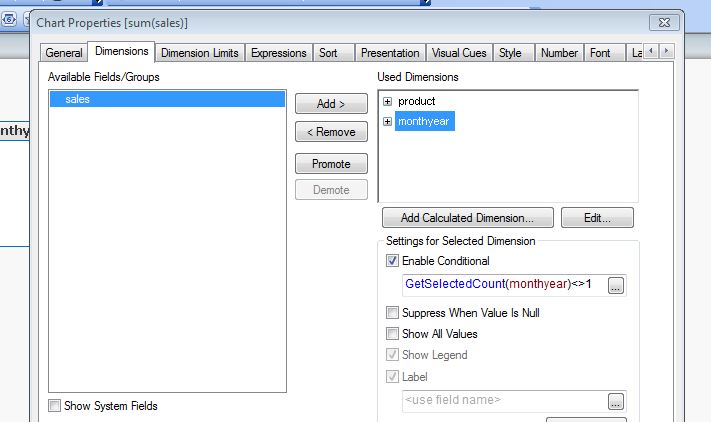
Attached the qvw for your reference.
Regards,
Vivek
.png "sasikanth")
 sasikanth
- Mark as New
- Bookmark
- Subscribe
- Mute
- Subscribe to RSS Feed
- Permalink
- Report Inappropriate Content
Hi,
Try this exp in Dimenion-> calculation condition
GetselectedCount(FilterYearMonth)=0