Unlock a world of possibilities! Login now and discover the exclusive benefits awaiting you.

- Qlik Community
- :
- All Forums
- :
- QlikView
- :
- Show Radius in a Map
- Subscribe to RSS Feed
- Mark Topic as New
- Mark Topic as Read
- Float this Topic for Current User
- Bookmark
- Subscribe
- Mute
- Printer Friendly Page

 microwin88x
- Mark as New
- Bookmark
- Subscribe
- Mute
- Subscribe to RSS Feed
- Permalink
- Report Inappropriate Content
Show Radius in a Map
Hello,
I have a map on my QlikView app with a point (latitude/longitude) as you can see.
So I'd like to draw a circle in the map (around 1 km) from that point like showed here:
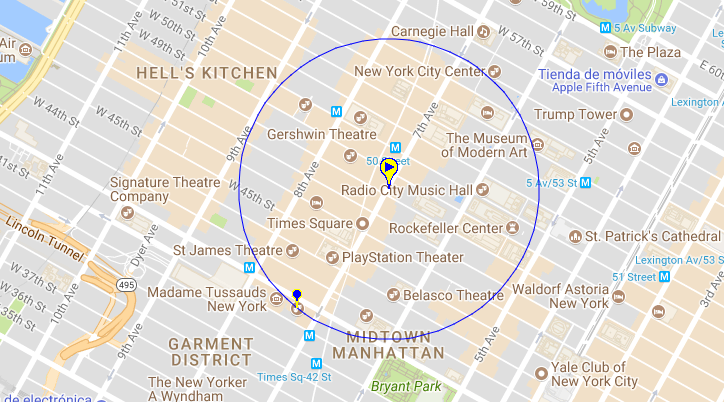
Besides this, I'm actually using the following expression to determine the distance in KM from other points to check how far they are:
ACOS(SIN($(vI_LAT_SOURCE)*PI()/180)*SIN(LATITUDE*PI()/180)+COS($(vI_LAT_SOURCE)*Pi()/180)*COS(LATITUDE*PI()/180)*COS((LONGITUDE*PI()/180)-($(vI_LONG_SOURCE)*PI()/180)))*6371 AS DISTANCE_KM
Do you know how to do that to show the circle in the map? Maybe a trick?
Thanks.

 Sergey_Shuklin
- Mark as New
- Bookmark
- Subscribe
- Mute
- Subscribe to RSS Feed
- Permalink
- Report Inappropriate Content
Hello!
Is there should be one circle on the map? If so - create a textbox object with 100% rounded corners with a border, make it transparent and use a condition to show it depend on a map size.
