Unlock a world of possibilities! Login now and discover the exclusive benefits awaiting you.

- Qlik Community
- :
- All Forums
- :
- QlikView
- :
- Show values with codition is null
- Subscribe to RSS Feed
- Mark Topic as New
- Mark Topic as Read
- Float this Topic for Current User
- Bookmark
- Subscribe
- Mute
- Printer Friendly Page

- Mark as New
- Bookmark
- Subscribe
- Mute
- Subscribe to RSS Feed
- Permalink
- Report Inappropriate Content
Show values with codition is null
I want to display values with condition column 'Hors Vente' = - (Null)
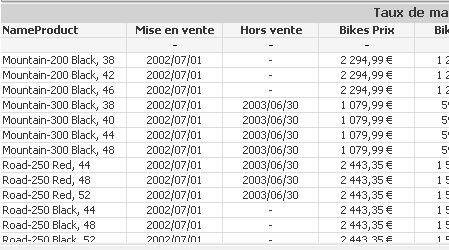
Thx in advance
- Tags:
- new_to_qlikview
- « Previous Replies
-
- 1
- 2
- Next Replies »
- Mark as New
- Bookmark
- Subscribe
- Mute
- Subscribe to RSS Feed
- Permalink
- Report Inappropriate Content
exactly...
thx in advance

 Kushal_Chawda
- Mark as New
- Bookmark
- Subscribe
- Mute
- Subscribe to RSS Feed
- Permalink
- Report Inappropriate Content
Create Calculated dimension.
if( Isnull([Hors Vente]) or len(trim([Hors Vente]))<=0, SellEndDateProduct,null())
Check Suppress when value is null for this calculated dimension
- Mark as New
- Bookmark
- Subscribe
- Mute
- Subscribe to RSS Feed
- Permalink
- Report Inappropriate Content
Does not work. I want to show only values (NameProduct) with condition column 'Hors vente' = Null or -
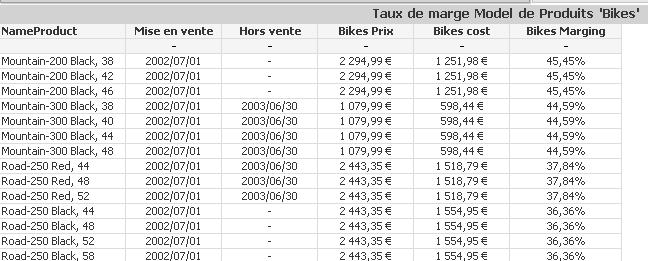
Kushal_Chawda
- Mark as New
- Bookmark
- Subscribe
- Mute
- Subscribe to RSS Feed
- Permalink
- Report Inappropriate Content
Can you post screenshot of your expression you have written? or it will be better if you can share sample application
 sunny_talwar
- Mark as New
- Bookmark
- Subscribe
- Mute
- Subscribe to RSS Feed
- Permalink
- Report Inappropriate Content
May be this:
=If(Len(Trim([Hors Vente])) = 0, NameProduct) and Check 'Suppress When Value is Null' on the Dimension tab.
The above calculated dimension expression should replace NameProduct dimension.
I hope this is what you are looking to get.
Best,
Sunny
- Mark as New
- Bookmark
- Subscribe
- Mute
- Subscribe to RSS Feed
- Permalink
- Report Inappropriate Content
Thx, but does not work
Stanley
- « Previous Replies
-
- 1
- 2
- Next Replies »