Unlock a world of possibilities! Login now and discover the exclusive benefits awaiting you.

- Qlik Community
- :
- All Forums
- :
- QlikView
- :
- Showing rows only with multiple events
- Subscribe to RSS Feed
- Mark Topic as New
- Mark Topic as Read
- Float this Topic for Current User
- Bookmark
- Subscribe
- Mute
- Printer Friendly Page

 farheenayesha
- Mark as New
- Bookmark
- Subscribe
- Mute
- Subscribe to RSS Feed
- Permalink
- Report Inappropriate Content
Showing rows only with multiple events
Hi,
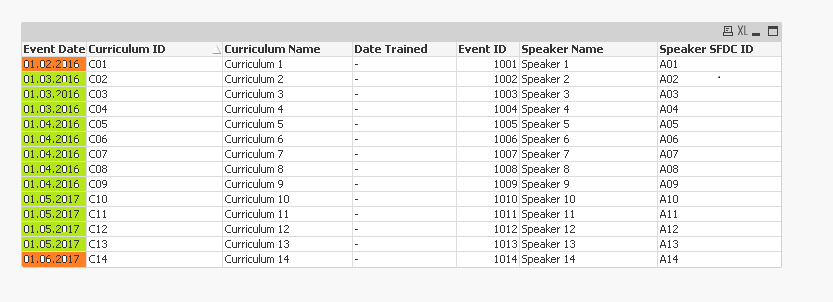
In a pivot able, i want to show event dates which has multiple events as below. In the below image, event date 01/03/2016,01/04/2016 and 01/05/2017 has multiple curriculum names and speaker names, hence i want to display only these dates.
Dates like 01/02/2016 and 01/06/2017 are having single curriculum name and speaker name, hence i want to eliminate these rows.
Kindly help.
In the below image, i want only rows highlighted in green color and remove which are highlighted in red. Please find the excel and QVW attached.
- « Previous Replies
- Next Replies »
farheenayesha
- Mark as New
- Bookmark
- Subscribe
- Mute
- Subscribe to RSS Feed
- Permalink
- Report Inappropriate Content
Yes I have two issues.
SFDC ID is a ID given to each speaker. Please find the business scenario below. Here we are trying to find false positive scenario.
Scenario : This view was introduced to identify Speakers who were engaged in a Speaker program without training on the curriculum they are going to speak on:- Identify the speakers not attended the training on the curriculum. A table will show events with multiple curriculums and speakers which is the false positive scenario.
How to identify False positive scenarios:-
Any Speaker record associated with events with multiple curriculum and speakers.
Please let me know if you need more information.

 sunny_talwar
- Mark as New
- Bookmark
- Subscribe
- Mute
- Subscribe to RSS Feed
- Permalink
- Report Inappropriate Content
Try this (Changes are highlighed in red)
Dimension
=Aggr(If(Count(TOTAL <[Event Start Date]> DISTINCT {<[Event Status]-={'DROPPED','HOLD','CANCEL'},[Event Type]={'SPKRPGM'},[Site Participant Attendance Status]={'ACCEPTED','ATTENDED'}>}If(Len(Trim([Date Trained])) = 0, [Vendor Event ID]&[Site Participant SFDC ID])) > 1, [Vendor Event ID]), [Event Start Date], [Vendor Event ID])
Expression
=If(Len(Trim([Date Trained])) = 0 and Match([Site Participant Attendance Status], 'ACCEPTED','ATTENDED'), Count(TOTAL <[Event Start Date]> DISTINCT {<[Event Status]-={'DROPPED','HOLD','CANCEL'},[Event Type]={'SPKRPGM'},[Site Participant Attendance Status]={'ACCEPTED','ATTENDED'}>}[Vendor Event ID]))
farheenayesha
- Mark as New
- Bookmark
- Subscribe
- Mute
- Subscribe to RSS Feed
- Permalink
- Report Inappropriate Content
You are amazing  Thank you so much.

- « Previous Replies
- Next Replies »