Unlock a world of possibilities! Login now and discover the exclusive benefits awaiting you.

Announcements
Want to see what's currently in public preview? We've pulled it all together in one place. Check it out here
- Qlik Community
- :
- All Forums
- :
- QlikView
- :
- Sort Order
Options
- Subscribe to RSS Feed
- Mark Topic as New
- Mark Topic as Read
- Float this Topic for Current User
- Bookmark
- Subscribe
- Mute
- Printer Friendly Page
Turn on suggestions
Auto-suggest helps you quickly narrow down your search results by suggesting possible matches as you type.
Showing results for

 upaliwije
Creator II
2017-09-12
12:45 PM
- Mark as New
- Bookmark
- Subscribe
- Mute
- Subscribe to RSS Feed
- Permalink
- Report Inappropriate Content
Sort Order
Hi Friends
I have following Pivot table in my doc
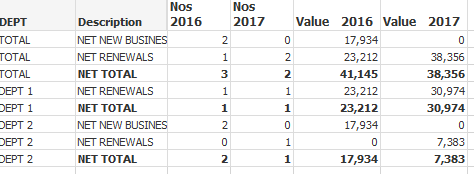
I want to Total Column come to the bottom of table and Dept 1 & Dept 2 to remain as it is. The sorting order is
sum(PREMIUM) descending
Further I have a calculated dimension as shown below
=pick(Dim,DEPT,'TOTAL')
Pls help me
3,080 Views
- « Previous Replies
-
- 1
- 2
- Next Replies »
12 Replies

 sunny_talwar
MVP
2017-09-13
04:23 AM
- Mark as New
- Bookmark
- Subscribe
- Mute
- Subscribe to RSS Feed
- Permalink
- Report Inappropriate Content
Is this not what you want?
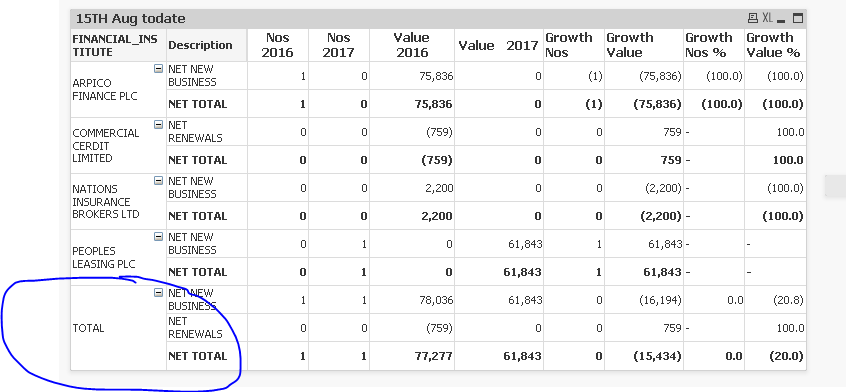
or is this not what you are seeing at your end?
651 Views
upaliwije
Creator II
2017-09-13
05:07 AM
Author
- Mark as New
- Bookmark
- Subscribe
- Mute
- Subscribe to RSS Feed
- Permalink
- Report Inappropriate Content
This is what I want . Highest Value in 2017 to come to the top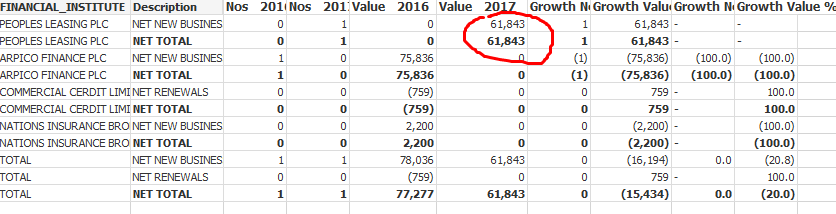
651 Views
sunny_talwar
MVP
2017-09-13
07:37 AM
- Mark as New
- Bookmark
- Subscribe
- Mute
- Subscribe to RSS Feed
- Permalink
- Report Inappropriate Content
Check with this
RangeSum(Only({1} DimF), -sum({<RISK_YEAR = {$(=Max(RISK_YEAR))},RISK_DATE={$(vP17)}>}PREMIUM)/1e10)
2,907 Views

- « Previous Replies
-
- 1
- 2
- Next Replies »