Unlock a world of possibilities! Login now and discover the exclusive benefits awaiting you.

Announcements
Share your agentic AI experience, learn from others, and earn a new badge: Put Agentic AI to Work
- Qlik Community
- :
- All Forums
- :
- QlikView
- :
- Sort Stacked Column Chart by Y-Axis Value??
Options
- Subscribe to RSS Feed
- Mark Topic as New
- Mark Topic as Read
- Float this Topic for Current User
- Bookmark
- Subscribe
- Mute
- Printer Friendly Page
Turn on suggestions
Auto-suggest helps you quickly narrow down your search results by suggesting possible matches as you type.
Showing results for

Not applicable
2012-05-16
09:59 AM
- Mark as New
- Bookmark
- Subscribe
- Mute
- Subscribe to RSS Feed
- Permalink
- Report Inappropriate Content
Sort Stacked Column Chart by Y-Axis Value??
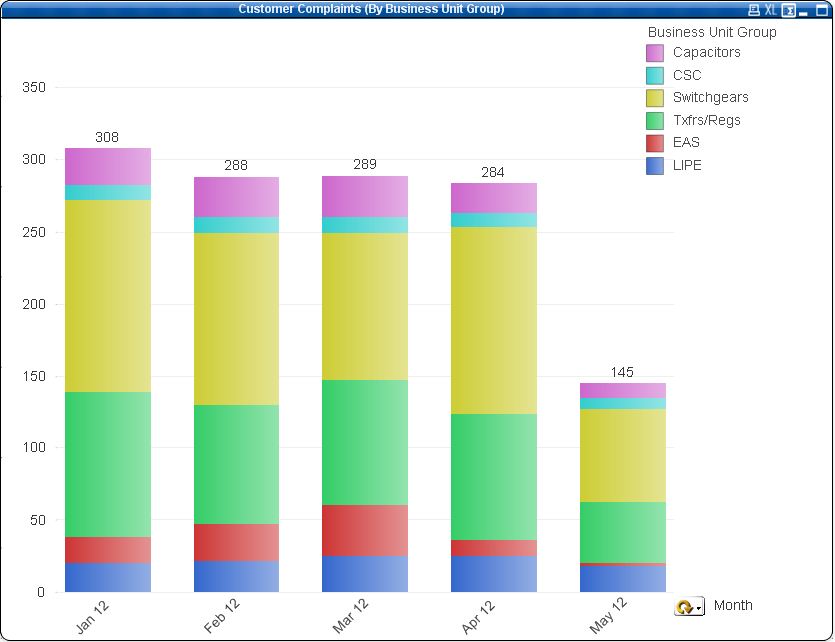
How do I make it so the Business Unit with the largest quantity is at the bottom of the stacked column and the smallest at the top? Can this be done for each column? Do I have to sort by expression? If so, what would I write?
2,558 Views
2 Replies

 vgutkovsky
Master II
2012-05-16
12:37 PM
- Mark as New
- Bookmark
- Subscribe
- Mute
- Subscribe to RSS Feed
- Permalink
- Report Inappropriate Content
Well, you can't do it for each column independently, but you can sort it by the total quantity per Business Unit (regardless of month). Under sort, select Business Unit Group and then sort it by expression descending, where you expression is sum(quantity) or whatever you used as your actual chart expression.
Regards,
Vlad
Not applicable
2013-01-29
07:12 AM
Author
- Mark as New
- Bookmark
- Subscribe
- Mute
- Subscribe to RSS Feed
- Permalink
- Report Inappropriate Content
Thanks Vlad, the above answer is correct! Hunt please mark as correct 