Unlock a world of possibilities! Login now and discover the exclusive benefits awaiting you.

Announcements
Want to see what's currently in public preview? We've pulled it all together in one place. Check it out here
- Qlik Community
- :
- All Forums
- :
- QlikView
- :
- Sorting Issue
Options
- Subscribe to RSS Feed
- Mark Topic as New
- Mark Topic as Read
- Float this Topic for Current User
- Bookmark
- Subscribe
- Mute
- Printer Friendly Page
Turn on suggestions
Auto-suggest helps you quickly narrow down your search results by suggesting possible matches as you type.
Showing results for

 panipat1990
Creator II
2016-09-12
04:45 AM
- Mark as New
- Bookmark
- Subscribe
- Mute
- Subscribe to RSS Feed
- Permalink
- Report Inappropriate Content
Sorting Issue
Hi Team,
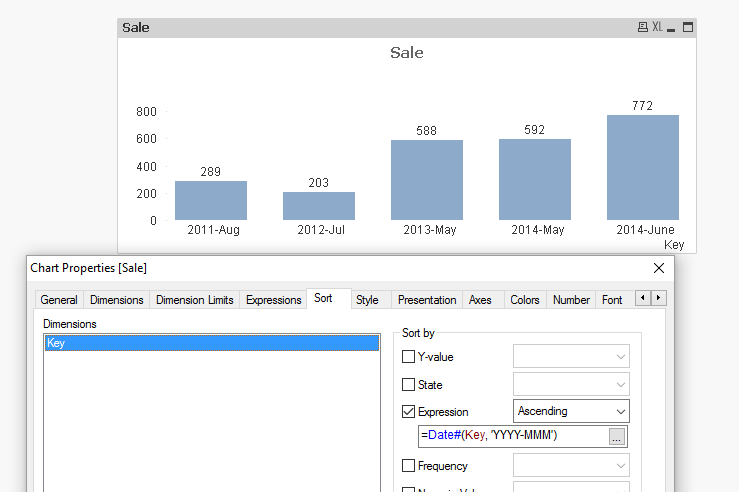
I have a reqruirment. How to sort Composite Key.. For this i am Sharing a qvw. in this A bar garph..i want to sort year month Key.Please Help me For sorting Issue
- Tags:
- qlikview_deployment
753 Views
1 Solution
Accepted Solutions

 sunny_talwar
MVP
2016-09-12
04:48 AM
- Mark as New
- Bookmark
- Subscribe
- Mute
- Subscribe to RSS Feed
- Permalink
- Report Inappropriate Content
2 Replies
sunny_talwar
MVP
2016-09-12
04:48 AM
- Mark as New
- Bookmark
- Subscribe
- Mute
- Subscribe to RSS Feed
- Permalink
- Report Inappropriate Content
May be use a sort expression:
=Date#(Key, 'YYYY-MMM')
 robert_mika
MVP
2016-09-12
04:54 AM
- Mark as New
- Bookmark
- Subscribe
- Mute
- Subscribe to RSS Feed
- Permalink
- Report Inappropriate Content
or you can change your script:
RegionSales:
Load * Inline
[ Region, Year, Month, Sales
North, 2014, 5, 245
North, 2014, 5, 347
North, 2014, 6, 127
South, 2014, 6, 645
South, 2013, 5, 367
South, 2013, 5, 221
East, 2012, 7, 203
West, 2011, 8, 289
];
Tab:
Load*,
Dual(Year&'-'&month(makedate(2001,Month,1)),Year&Month) As Key
Resident RegionSales;
Drop Table RegionSales;
