Unlock a world of possibilities! Login now and discover the exclusive benefits awaiting you.

- Qlik Community
- :
- All Forums
- :
- QlikView
- :
- Sorting Key
- Subscribe to RSS Feed
- Mark Topic as New
- Mark Topic as Read
- Float this Topic for Current User
- Bookmark
- Subscribe
- Mute
- Printer Friendly Page

- Mark as New
- Bookmark
- Subscribe
- Mute
- Subscribe to RSS Feed
- Permalink
- Report Inappropriate Content
Sorting Key
I want to change the order of my key by customizing it (i.e. Not ascending, descending by x or y value)
I have the following items in my one table ('Not Started', 'In Progress', 'In Review', 'Done', 'Onboarding Unsuccessful'). This is the order I would like them in.
How would I write an expression to sort them in this way?
Thank you!

 sunny_talwar
- Mark as New
- Bookmark
- Subscribe
- Mute
- Subscribe to RSS Feed
- Permalink
- Report Inappropriate Content
May be a sort expression like this
Match(FieldName, 'Not Started', 'In Progress', 'In Review', 'Done', 'Onboarding Unsuccessful')

 its_anandrjs
- Mark as New
- Bookmark
- Subscribe
- Mute
- Subscribe to RSS Feed
- Permalink
- Report Inappropriate Content
Maybe another one
Only( Match(FieldName, 'Not Started', 'In Progress', 'In Review', 'Done', 'Onboarding Unsuccessful') )
Or
Only( {1} Match(FieldName, 'Not Started', 'In Progress', 'In Review', 'Done', 'Onboarding Unsuccessful') )
 MarcoWedel
- Mark as New
- Bookmark
- Subscribe
- Mute
- Subscribe to RSS Feed
- Permalink
- Report Inappropriate Content
Hi,
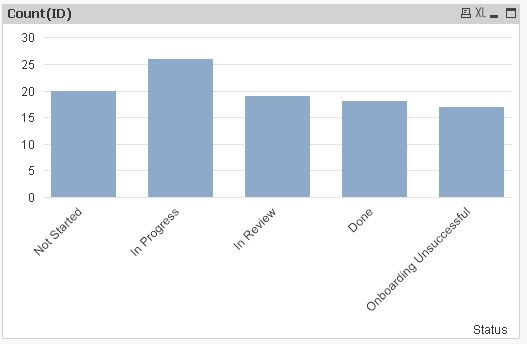
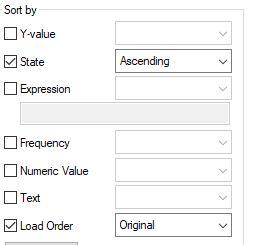
another solution might be to preload this field e.g. using an inline load and check the "sort by ... load order" option in the sorting tab of your chart properties:
tabSortStatus:
LOAD * INLINE [
    Status
    Not Started
    In Progress
    In Review
    Done
    Onboarding Unsuccessful
];

table1:
LOAD RecNo() as ID,
     Pick(Ceil(Rand()*5), 'Not Started', 'In Progress', 'In Review', 'Done', 'Onboarding Unsuccessful') as Status
AutoGenerate 100;
hope this helps
regards
Marco