Unlock a world of possibilities! Login now and discover the exclusive benefits awaiting you.

- Qlik Community
- :
- All Forums
- :
- QlikView
- :
- Sorting months chronologically in bar chart
- Subscribe to RSS Feed
- Mark Topic as New
- Mark Topic as Read
- Float this Topic for Current User
- Bookmark
- Subscribe
- Mute
- Printer Friendly Page

- Mark as New
- Bookmark
- Subscribe
- Mute
- Subscribe to RSS Feed
- Permalink
- Report Inappropriate Content
Sorting months chronologically in bar chart
My source data has a column called "CalendarMonth" and the months are listed out: April, May, etc.
On my bar chart, they are going from left to right: March, October, November, July, January, May, April, August, September, June, February, December.
I just want them to go chronologically Jan-Dec. I tried searching these forums, but still not getting it to work. I am not sure this applies to me: How do I order months in a bar chart chronologi... | Qlik Community
- « Previous Replies
-
- 1
- 2
- Next Replies »
- Mark as New
- Bookmark
- Subscribe
- Mute
- Subscribe to RSS Feed
- Permalink
- Report Inappropriate Content
Oh I see what the problem was, I just did your approach but changed it to CalendarMonth, instead of just Month. It worked!! Thank you so much!!!!!!!!!! I am very new to this and was just thrown into this project last minute, so I am learning everything as I go. You have been a huge help to me.
- Mark as New
- Bookmark
- Subscribe
- Mute
- Subscribe to RSS Feed
- Permalink
- Report Inappropriate Content
Are your months chronologically ordered when you make a listbox from the CalendarMonth ?

 vishsaggi
- Mark as New
- Bookmark
- Subscribe
- Mute
- Subscribe to RSS Feed
- Permalink
- Report Inappropriate Content
I used to use the same approach as Thirumala mentioned above. You said Bad Field Name is your field name -> "Calendar_Month" has an underscore or just CalendarMonth ??
- Mark as New
- Bookmark
- Subscribe
- Mute
- Subscribe to RSS Feed
- Permalink
- Report Inappropriate Content
Hey Sunny-
On certain filters, there is zero data for some months. They are in chronological order now, but the months for where there is no data, they are at the end. I want to keep the zero value months, but i want them to appear in order. I also have a random blank spot after January that i need to remove. see attached.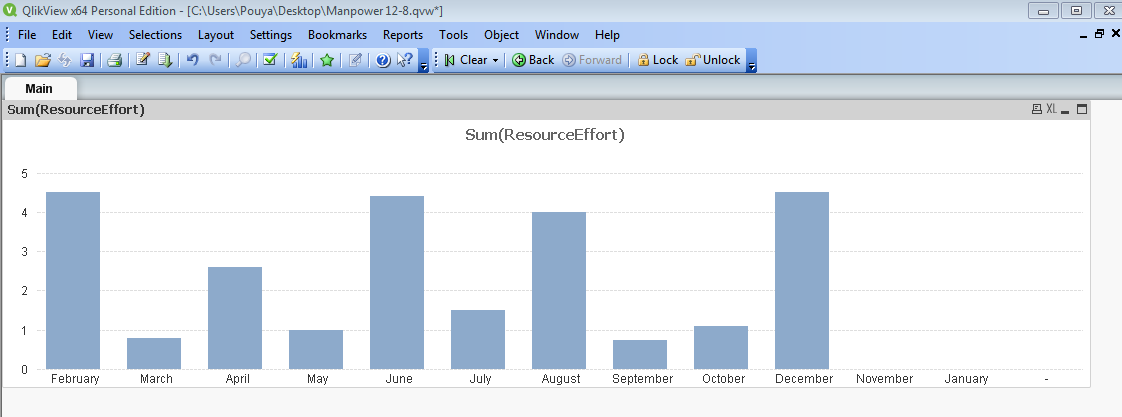 . see attached

 sunny_talwar
- Mark as New
- Bookmark
- Subscribe
- Mute
- Subscribe to RSS Feed
- Permalink
- Report Inappropriate Content
Give this a try
Date#(Only({1} Month), 'MMMM')
- Mark as New
- Bookmark
- Subscribe
- Mute
- Subscribe to RSS Feed
- Permalink
- Report Inappropriate Content
That worked Sunny, but for some reason I still have a random blank spot at the end.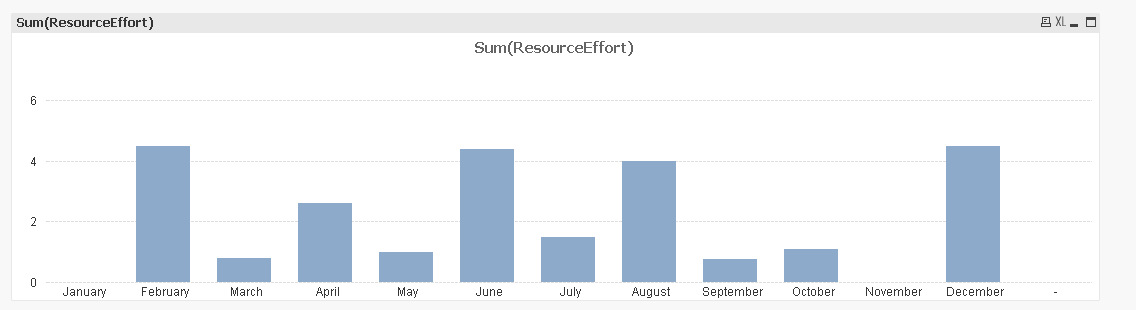
sunny_talwar
- Mark as New
- Bookmark
- Subscribe
- Mute
- Subscribe to RSS Feed
- Permalink
- Report Inappropriate Content
On the dimension tab, you can select 'Suppress When Value Is Null' and those blanks will go away 
- Mark as New
- Bookmark
- Subscribe
- Mute
- Subscribe to RSS Feed
- Permalink
- Report Inappropriate Content
I have so much to learn. thank you.
- « Previous Replies
-
- 1
- 2
- Next Replies »