Unlock a world of possibilities! Login now and discover the exclusive benefits awaiting you.

- Qlik Community
- :
- All Forums
- :
- QlikView
- :
- Sorting problem
- Subscribe to RSS Feed
- Mark Topic as New
- Mark Topic as Read
- Float this Topic for Current User
- Bookmark
- Subscribe
- Mute
- Printer Friendly Page

 k_burata
- Mark as New
- Bookmark
- Subscribe
- Mute
- Subscribe to RSS Feed
- Permalink
- Report Inappropriate Content
Sorting problem
Hi,
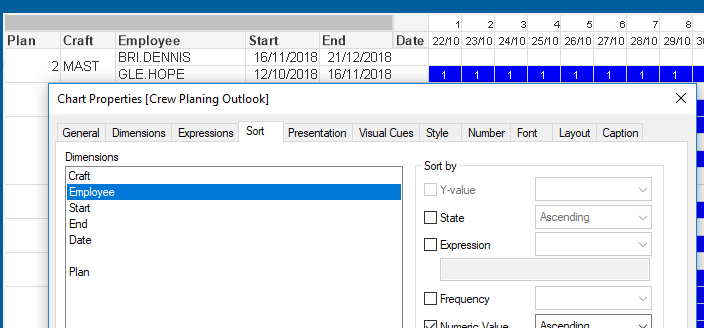
How do I change sorting of dimensions? I would basically to follow the sort order of the Pivot Table Dimensions. So GLE.HOPE should come first since his start date comes first. I know it was correct when I first did it but Plan was relegated to the bottom and I cant manually change the Order.
Regards,
Accepted Solutions

 jonathandienst
- Mark as New
- Bookmark
- Subscribe
- Mute
- Subscribe to RSS Feed
- Permalink
- Report Inappropriate Content
You can't change the order of the dimensions sorting in a pivot, but you can control how each dimension sorts.
To sort Employee by date, use the expression option for Employee. If the dates are normal numeric date values, then =Start or =(-Start) should be enough.

- Mark as New
- Bookmark
- Subscribe
- Mute
- Subscribe to RSS Feed
- Permalink
- Report Inappropriate Content
Hi Burata,
Kindly remove the first two dimension's sort . so chart will sort based on Start dimension
Thanks
jonathandienst
- Mark as New
- Bookmark
- Subscribe
- Mute
- Subscribe to RSS Feed
- Permalink
- Report Inappropriate Content
You can't change the order of the dimensions sorting in a pivot, but you can control how each dimension sorts.
To sort Employee by date, use the expression option for Employee. If the dates are normal numeric date values, then =Start or =(-Start) should be enough.