Unlock a world of possibilities! Login now and discover the exclusive benefits awaiting you.

- Qlik Community
- :
- All Forums
- :
- QlikView
- :
- Space between dimensions in Pivot Table
- Subscribe to RSS Feed
- Mark Topic as New
- Mark Topic as Read
- Float this Topic for Current User
- Bookmark
- Subscribe
- Mute
- Printer Friendly Page

- Mark as New
- Bookmark
- Subscribe
- Mute
- Subscribe to RSS Feed
- Permalink
- Report Inappropriate Content
Space between dimensions in Pivot Table
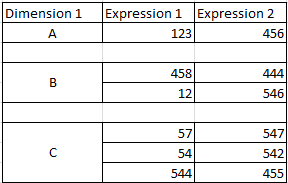
I have a pivot table with a few dimensions and expressions. Would it be possible to display a space (empty row) between each individual dimension values as shown in the attached image.
- Tags:
- new_to_qlikview
Accepted Solutions

 Gysbert_Wassena
- Mark as New
- Bookmark
- Subscribe
- Mute
- Subscribe to RSS Feed
- Permalink
- Report Inappropriate Content
Sort of. Create a pivot table. Change your expressions to something like =if(dimensionality()=1, ...original_expression, ''). Enable the option Always Fully Expanded. Enable Partial sums for Dimension 1 and set the Label for Totals to a single space.
talk is cheap, supply exceeds demand
Gysbert_Wassena- Mark as New
- Bookmark
- Subscribe
- Mute
- Subscribe to RSS Feed
- Permalink
- Report Inappropriate Content
Sort of. Create a pivot table. Change your expressions to something like =if(dimensionality()=1, ...original_expression, ''). Enable the option Always Fully Expanded. Enable Partial sums for Dimension 1 and set the Label for Totals to a single space.
talk is cheap, supply exceeds demand