Unlock a world of possibilities! Login now and discover the exclusive benefits awaiting you.

- Qlik Community
- :
- All Forums
- :
- QlikView
- :
- Stacked Combi Chart
Options
- Subscribe to RSS Feed
- Mark Topic as New
- Mark Topic as Read
- Float this Topic for Current User
- Bookmark
- Subscribe
- Mute
- Printer Friendly Page
Turn on suggestions
Auto-suggest helps you quickly narrow down your search results by suggesting possible matches as you type.
Showing results for

Not applicable
2014-06-13
05:29 AM
- Mark as New
- Bookmark
- Subscribe
- Mute
- Subscribe to RSS Feed
- Permalink
- Report Inappropriate Content
Stacked Combi Chart
Hello
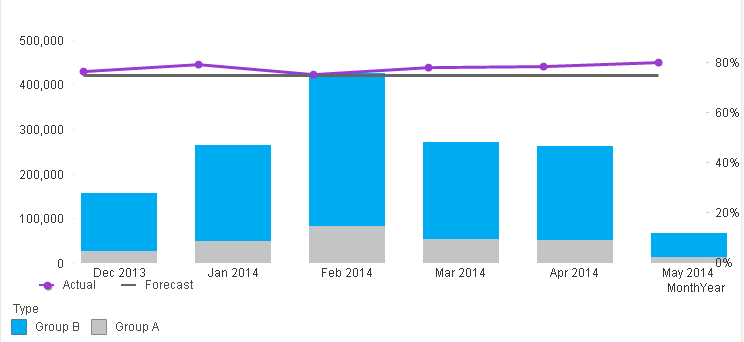
I am trying to create a stacked combi chart but every time I bring in a line and split the axis the bars stop being stacked. Does anyone know of away to get around this please?
Thanks,
Tari
553 Views
3 Replies
Anonymous
Not applicable
2014-06-13
05:32 AM
Author
- Mark as New
- Bookmark
- Subscribe
- Mute
- Subscribe to RSS Feed
- Permalink
- Report Inappropriate Content
IN the Style tab
Use the only the Grouped then u might be succeeded
472 Views

 MK_QSL
MVP
2014-06-13
05:40 AM
- Mark as New
- Bookmark
- Subscribe
- Mute
- Subscribe to RSS Feed
- Permalink
- Report Inappropriate Content
Kindly provide your sample file...
472 Views
Not applicable
2014-06-13
05:59 AM
Author
- Mark as New
- Bookmark
- Subscribe
- Mute
- Subscribe to RSS Feed
- Permalink
- Report Inappropriate Content
I am trying to create something that looks a bit like this. I've pulled this together by layering two seperate charts which obviously isn't ideal. Unfortunately once you enable a line expression in the combi chart the Subtype section becomes greyed out in the Style tab.
472 Views