Unlock a world of possibilities! Login now and discover the exclusive benefits awaiting you.

- Qlik Community
- :
- All Forums
- :
- QlikView
- :
- Straight Table Font Change
- Subscribe to RSS Feed
- Mark Topic as New
- Mark Topic as Read
- Float this Topic for Current User
- Bookmark
- Subscribe
- Mute
- Printer Friendly Page

 dwfiv327
- Mark as New
- Bookmark
- Subscribe
- Mute
- Subscribe to RSS Feed
- Permalink
- Report Inappropriate Content
Straight Table Font Change
I have a straight table for which I want to do some special formatting. One column has a date value. If it is blank, I want the rest of the row to have a different background color and to be larger. I can get the color changed by going to Expressions or Dimensions tab, expanding the + in front of the expression or dimension and entering =if(ResDate=' ',Green()) in the Background Color dialog.
What function or value to I put in the Text Format dialog to change the font size?
Accepted Solutions

 rwunderlich
- Mark as New
- Bookmark
- Subscribe
- Mute
- Subscribe to RSS Feed
- Permalink
- Report Inappropriate Content
According to the help
https://help.qlik.com/en-US/qlikview/November2017/Subsystems/Client/Content/Straight_Table.htm
only <B>, <I> and <U> are available.
-Rob

 stigchel
- Mark as New
- Bookmark
- Subscribe
- Mute
- Subscribe to RSS Feed
- Permalink
- Report Inappropriate Content
You can use these
//Expression Attributes text format
'<B>' =BOLD
'<I>' =ITALIC
'<H1>' =Bigger Font
'<H6>' =Smaller Font
dwfiv327
- Mark as New
- Bookmark
- Subscribe
- Mute
- Subscribe to RSS Feed
- Permalink
- Report Inappropriate Content
<B> works but <H1> does not.
stigchel
- Mark as New
- Bookmark
- Subscribe
- Mute
- Subscribe to RSS Feed
- Permalink
- Report Inappropriate Content
Hmm, I can remember it working sometime, this came from my notes I keep. Now, I can't get it to work either and a search came up empty, sorry
rwunderlich
- Mark as New
- Bookmark
- Subscribe
- Mute
- Subscribe to RSS Feed
- Permalink
- Report Inappropriate Content
According to the help
https://help.qlik.com/en-US/qlikview/November2017/Subsystems/Client/Content/Straight_Table.htm
only <B>, <I> and <U> are available.
-Rob

 Frank_Hartmann
- Mark as New
- Bookmark
- Subscribe
- Mute
- Subscribe to RSS Feed
- Permalink
- Report Inappropriate Content
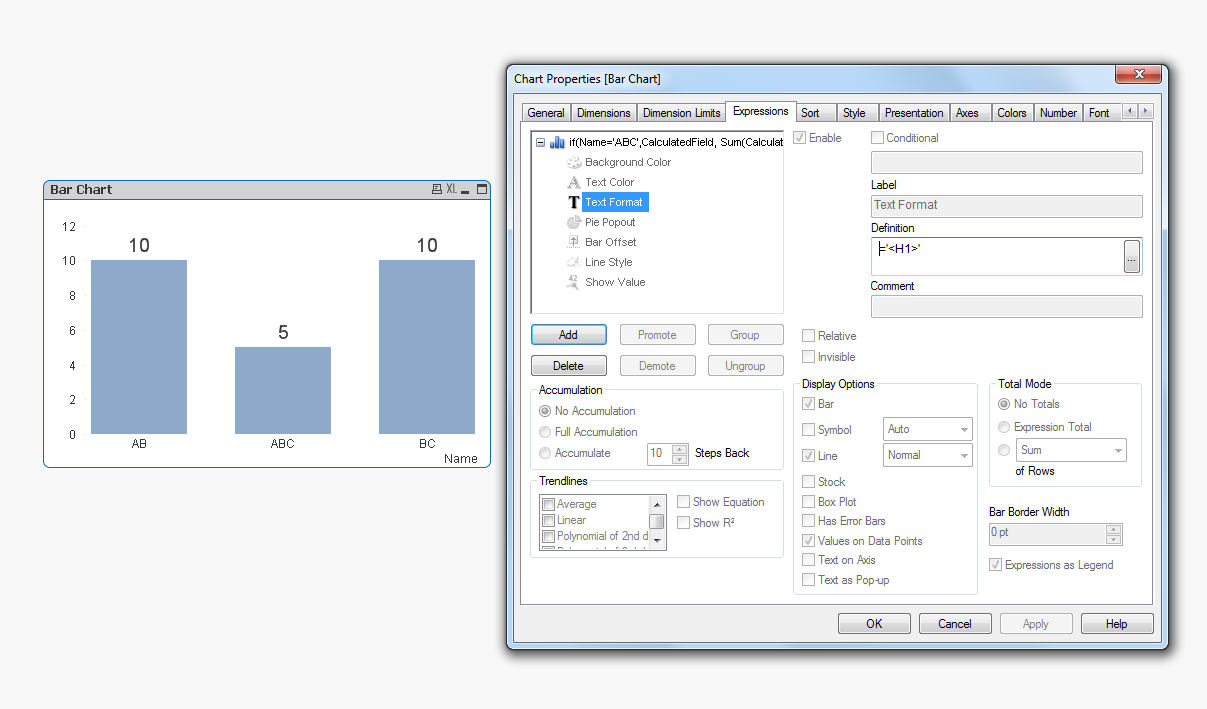
As far as I remember the '<H1>' only works for values on datapoints in line/bar chart.
If you need to increase the font you will have to use custom format cell:
View --> Design Grid then right click on the straight table and then there is the option custom format cell available.
dwfiv327
- Mark as New
- Bookmark
- Subscribe
- Mute
- Subscribe to RSS Feed
- Permalink
- Report Inappropriate Content
Tried View-->Design Grid and it behaves weirdly. When I select the cell I want to format, it formats every other row to match! (So one big, one small, one big, one small and so on.) I want to conditionally format any cell that meets a certain criteria.
Thanks for pointing out Design Grid anyway. I didn't even know that function existed!
Frank_Hartmann
- Mark as New
- Bookmark
- Subscribe
- Mute
- Subscribe to RSS Feed
- Permalink
- Report Inappropriate Content
with custom format cell you can only apply the format either to dimension or to expression or to dimension and expression!
stigchel
- Mark as New
- Bookmark
- Subscribe
- Mute
- Subscribe to RSS Feed
- Permalink
- Report Inappropriate Content
Ah that was it, couldn't remember