Unlock a world of possibilities! Login now and discover the exclusive benefits awaiting you.

- Qlik Community
- :
- All Forums
- :
- QlikView
- :
- Straight table issue
Options
- Subscribe to RSS Feed
- Mark Topic as New
- Mark Topic as Read
- Float this Topic for Current User
- Bookmark
- Subscribe
- Mute
- Printer Friendly Page
Turn on suggestions
Auto-suggest helps you quickly narrow down your search results by suggesting possible matches as you type.
Showing results for

Not applicable
2017-06-14
03:29 AM
- Mark as New
- Bookmark
- Subscribe
- Mute
- Subscribe to RSS Feed
- Permalink
- Report Inappropriate Content
Straight table issue
Dear All,
I am searching on following problem.
I've created a straight table and with certain selections I generate the output below:
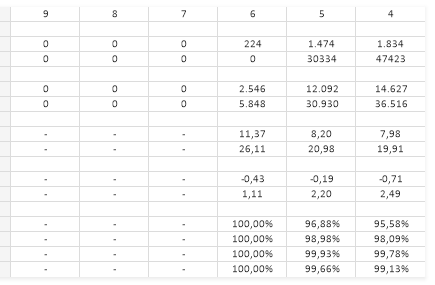
I don't want to see dimensions where all data is 0 or '-'. I only want to see the columns with actual data (6,5 and 4)
All options 'Suppress When Value is Null' are already flagged in the object.
Any other ideas/proposals?
Kind regards,
CM
- Tags:
- avoid empty output
- new to qlikview
- new_to_qlikview
- straight table
- straight table empty columns
- straight table output
- straight table visual tricks
2,967 Views
- « Previous Replies
-
- 1
- 2
- Next Replies »
10 Replies

 sunny_talwar
MVP
2017-06-14
09:43 AM
- Mark as New
- Bookmark
- Subscribe
- Mute
- Subscribe to RSS Feed
- Permalink
- Report Inappropriate Content
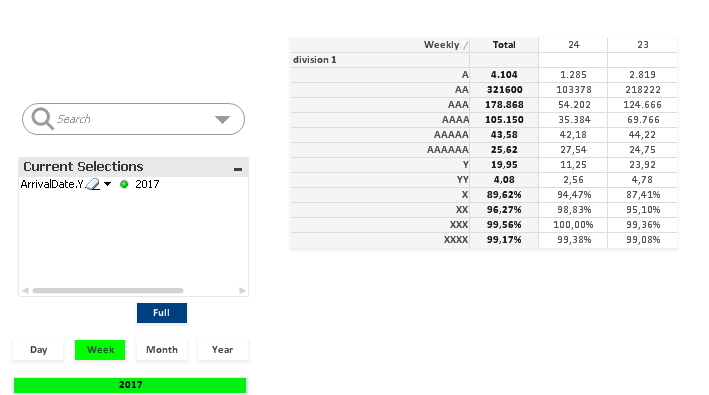
Lol, then change your expression to this
=If(Column(2) <> 0, '')
Since you made division1 as your Column(1), use Column(2). Alternatively, you can use =If(A <> 0, '') (Column label)
- « Previous Replies
-
- 1
- 2
- Next Replies »