Unlock a world of possibilities! Login now and discover the exclusive benefits awaiting you.

- Qlik Community
- :
- All Forums
- :
- QlikView
- :
- Submit button
- Subscribe to RSS Feed
- Mark Topic as New
- Mark Topic as Read
- Float this Topic for Current User
- Bookmark
- Subscribe
- Mute
- Printer Friendly Page

 Mahamed_Qlik
- Mark as New
- Bookmark
- Subscribe
- Mute
- Subscribe to RSS Feed
- Permalink
- Report Inappropriate Content
Submit button
Hi All,
Need quick help or workaround if not possible.
As per the requirement, Submit button should not have frame .
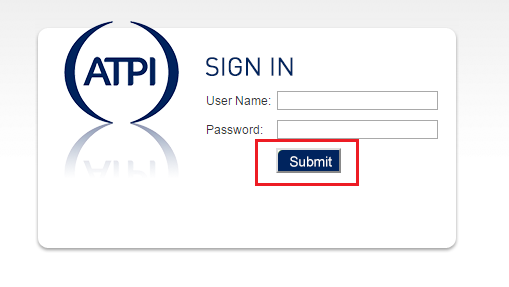
Kindly advise.
Regards,
Mahamed
- « Previous Replies
- Next Replies »
Mahamed_Qlik
- Mark as New
- Bookmark
- Subscribe
- Mute
- Subscribe to RSS Feed
- Permalink
- Report Inappropriate Content
So u mean, I have to add this extra script to the existing ?
so, it will look like :
body {font: 11px Arial, sans-serif; color: #333;text-align:center;background:#e8e8e8;}
#frame {width:100%;background:#fff url('images/bg_body.png') repeat-x right top;height:100%;*height:auto;}
a {text-decoration: none;cursor:pointer;}
a img {border: none;}
a:link, a:visited {color: #333;}
html body a:hover {text-decoration:underline; color:#439400;}
#loginBox .loginSubmitButton {
width:100px;
border:0px;
height:40px
}
??

 Clever_Anjos
- Mark as New
- Bookmark
- Subscribe
- Mute
- Subscribe to RSS Feed
- Permalink
- Report Inappropriate Content
Yes...
Clever_Anjos
- Mark as New
- Bookmark
- Subscribe
- Mute
- Subscribe to RSS Feed
- Permalink
- Report Inappropriate Content
And remember clearing you browser cache for testing purposes.
Ctrl+F5 should be enough
Mahamed_Qlik
- Mark as New
- Bookmark
- Subscribe
- Mute
- Subscribe to RSS Feed
- Permalink
- Report Inappropriate Content
Hi Clever,
Thank you so much for you help,
I will quickly try this and will come you for any issues or to mark your answer to correct 
Regards,
Mahamed

- « Previous Replies
- Next Replies »