Unlock a world of possibilities! Login now and discover the exclusive benefits awaiting you.

- Qlik Community
- :
- All Forums
- :
- QlikView
- :
- Sum IF, but from previous date with data
- Subscribe to RSS Feed
- Mark Topic as New
- Mark Topic as Read
- Float this Topic for Current User
- Bookmark
- Subscribe
- Mute
- Printer Friendly Page

- Mark as New
- Bookmark
- Subscribe
- Mute
- Subscribe to RSS Feed
- Permalink
- Report Inappropriate Content
Sum IF, but from previous date with data
Hi,
I need to sum like below but for the previous applicable date, any ideas?
=SUM(IF(Type='XXXX',Amount))
- « Previous Replies
- Next Replies »
Accepted Solutions

 sunny_talwar
- Mark as New
- Bookmark
- Subscribe
- Mute
- Subscribe to RSS Feed
- Permalink
- Report Inappropriate Content
Does this looks right. But this will need to be configured even more in case there are more than 4 holidays (weekend +holidays) in a row.
Expression:
=If(sum(if(Pmt_Subtype='Credit line connected payment',Pmt_amount)) <> 0, If(Above(sum(if(Pmt_Subtype='Credit line connected payment',Pmt_amount)),4) = 0,
If(Above(sum(if(Pmt_Subtype='Credit line connected payment',Pmt_amount)),3) = 0, If(Above(sum(if(Pmt_Subtype='Credit line connected payment',Pmt_amount)),2) = 0,
If(Above(sum(if(Pmt_Subtype='Credit line connected payment',Pmt_amount)),1) = 0, Above(sum(if(Pmt_Subtype='Credit line connected payment',Pmt_amount)),5),
Above(sum(if(Pmt_Subtype='Credit line connected payment',Pmt_amount)),1)), Above(sum(if(Pmt_Subtype='Credit line connected payment',Pmt_amount)),1)),
Above(sum(if(Pmt_Subtype='Credit line connected payment',Pmt_amount)),1)), If(Above(sum(if(Pmt_Subtype='Credit line connected payment',Pmt_amount)),2) = 0 and
Above(sum(if(Pmt_Subtype='Credit line connected payment',Pmt_amount)),1) = 0,
Above(sum(if(Pmt_Subtype='Credit line connected payment',Pmt_amount)),3), Above(sum(if(Pmt_Subtype='Credit line connected payment',Pmt_amount)),1))))
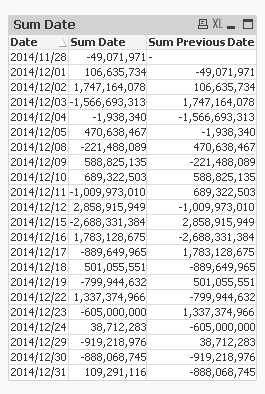
Best,
S
- Mark as New
- Bookmark
- Subscribe
- Mute
- Subscribe to RSS Feed
- Permalink
- Report Inappropriate Content
Use set analysis. Try this...I would recommend create variable for previous date.
=sum({<Type={XXX}, Date={$(=Max(Date)-1)}>}Amount)
- Mark as New
- Bookmark
- Subscribe
- Mute
- Subscribe to RSS Feed
- Permalink
- Report Inappropriate Content
Hi Rajan,
what if Date-1 does not have any data?
Kind Regards,
Olle
- Mark as New
- Bookmark
- Subscribe
- Mute
- Subscribe to RSS Feed
- Permalink
- Report Inappropriate Content
qlikview will ignore the null values and sum all other values
sunny_talwar
- Mark as New
- Bookmark
- Subscribe
- Mute
- Subscribe to RSS Feed
- Permalink
- Report Inappropriate Content
Why would you want to sum Date-1 if you won't have any data in it?
Best,
S
- Mark as New
- Bookmark
- Subscribe
- Mute
- Subscribe to RSS Feed
- Permalink
- Report Inappropriate Content
I dont.
For instance today is monday then I want Date-1 to sum up friday.
Best,
Olle

 mukesh24
- Mark as New
- Bookmark
- Subscribe
- Mute
- Subscribe to RSS Feed
- Permalink
- Report Inappropriate Content
Hi,
To solve these use set analysis
Simply create variable as:-
vMaxYear = max(Year)
vMaxMonth=max({<Year = {"$(vMaxYear)"}>}Month)
vPrevMonth = month(addmonths(makedate($(vMaxYear), $(vMaxMonth)),-1))
vPrevYear = Year(addmonths(makedate($(vMaxYear), $(vMaxMonth)),-1))
Use above variables in expression using set analysis..
For Current Month selection
sum({<Year = {"$(vMaxYear)"},Month={"$(vMaxMonth)"}>}Amount)
for last month
sum({<Year = {"$(vPrevYear)"},Month={"$(vPrevMonth)"},Year=,Month=>}Amount)
Regards,
Mukesh Chaudhari
- Mark as New
- Bookmark
- Subscribe
- Mute
- Subscribe to RSS Feed
- Permalink
- Report Inappropriate Content
Getting zero values Im afriad.
Could it be something with my dates?
sunny_talwar
- Mark as New
- Bookmark
- Subscribe
- Mute
- Subscribe to RSS Feed
- Permalink
- Report Inappropriate Content
You can use a if statement in that case:
vPreviousDate = If(WeekDay(Max(Date)) = 'Mon', Date(Max(Date) - 3), Date(Max(Date) -1)))
=Sum({<Type={XXX}, Date={'$(vPreviousDate)'}>} Amount)
Best,
S
- Mark as New
- Bookmark
- Subscribe
- Mute
- Subscribe to RSS Feed
- Permalink
- Report Inappropriate Content
hmm, that is a nice looking approach.
But how would I apply it to days rather than months and years?
Best Regards,
Olle
- « Previous Replies
- Next Replies »