Unlock a world of possibilities! Login now and discover the exclusive benefits awaiting you.

- Qlik Community
- :
- All Forums
- :
- QlikView
- :
- Re: Sum Rangeavg
- Subscribe to RSS Feed
- Mark Topic as New
- Mark Topic as Read
- Float this Topic for Current User
- Bookmark
- Subscribe
- Mute
- Printer Friendly Page

 Duck
Duck
- Mark as New
- Bookmark
- Subscribe
- Mute
- Subscribe to RSS Feed
- Permalink
- Report Inappropriate Content
Sum Rangeavg
this is the result of a rangesum
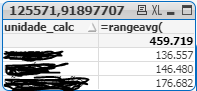
how to sum the rangeavg result and arrive at a unique value?
459.719
Accepted Solutions

 wade12
- Mark as New
- Bookmark
- Subscribe
- Mute
- Subscribe to RSS Feed
- Permalink
- Report Inappropriate Content
not sure i fully understand your question,
but if i create a text box and use the expression
=RangeAvg(1,2,3,4) + RangeAvg(5,6,7,8)
then i get 9 as the correct result.
hope this helps.
wade12
- Mark as New
- Bookmark
- Subscribe
- Mute
- Subscribe to RSS Feed
- Permalink
- Report Inappropriate Content
not sure i fully understand your question,
but if i create a text box and use the expression
=RangeAvg(1,2,3,4) + RangeAvg(5,6,7,8)
then i get 9 as the correct result.
hope this helps.
Duck
- Mark as New
- Bookmark
- Subscribe
- Mute
- Subscribe to RSS Feed
- Permalink
- Report Inappropriate Content
I understand, but in this situation I should individualize the means, rangeavg (1) + rangeavg (2) + rangeavg (3), but what if there are many values. must have a way of grouping these values automatically.
wade12
- Mark as New
- Bookmark
- Subscribe
- Mute
- Subscribe to RSS Feed
- Permalink
- Report Inappropriate Content
maybe code it in the load script and use a for loop to iterate through the many values.

 marcus_sommer
- Mark as New
- Bookmark
- Subscribe
- Mute
- Subscribe to RSS Feed
- Permalink
- Report Inappropriate Content
The example is rather confusing ... but I assume you want to do something like this:
sum(aggr(rangeavg(YourContent), unidade_calc))
- Marcus
