Unlock a world of possibilities! Login now and discover the exclusive benefits awaiting you.

- Qlik Community
- :
- All Forums
- :
- QlikView
- :
- Sum TOTAL with TOP N
- Subscribe to RSS Feed
- Mark Topic as New
- Mark Topic as Read
- Float this Topic for Current User
- Bookmark
- Subscribe
- Mute
- Printer Friendly Page

 Facundo
- Mark as New
- Bookmark
- Subscribe
- Mute
- Subscribe to RSS Feed
- Permalink
- Report Inappropriate Content
Sum TOTAL with TOP N
Hi!, sorry for my bad english, I have a chart to display the top 5 VALOR_FIJO per FILIAL, but i need an expression to display the sum(total <FILIAL> NUM_CANTIDAD), but is always filtered for the top 5 of VALOR_FIJO, i've tried sum({<VALOR_FIJO=>} total <FILIAL> NUM_CANTIDAD) without success.
Pivot Table :
Dimension 1 : Filial
Dimension 2 : =aggr(if(rank(sum(NUM_IMPORTE_TOTAL_MAPA_CONTRATO))<=5,VALOR_FIJO),VALOR_FIJO)
Expression : SUM({<VALOR_FIJO=>} TOTAL <FILIAL> NUM_CANTIDAD)
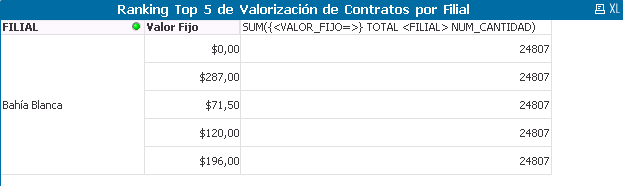
The chart is displaying 24807, but the real number is 61196.
24807 is the total of the VALOR_FIJO displaying.
| VALOR_FIJO | SUM(NUM_CANTIDAD) |
| 0.00 | 8907 |
| 287.00 | 7708 |
| 71.50 | 4336 |
| 120.00 | 2363 |
| 196.00 | 1493 |
TOTAL : 24807
I can get the real value if i remove the <FILIAL> from the expression : sum({<VALOR_FIJO=>} total NUM_CANTIDAD)
But if I filter more than 1 FILIAL, I get the full total, and not the total of each FILIAL.
Any ideas of how can i achieve this?
Thanks!
Accepted Solutions

 sunny_talwar
- Mark as New
- Bookmark
- Subscribe
- Mute
- Subscribe to RSS Feed
- Permalink
- Report Inappropriate Content
sunny_talwar
- Mark as New
- Bookmark
- Subscribe
- Mute
- Subscribe to RSS Feed
- Permalink
- Report Inappropriate Content
Would you be able to share your app to try out few things?
Facundo
- Mark as New
- Bookmark
- Subscribe
- Mute
- Subscribe to RSS Feed
- Permalink
- Report Inappropriate Content
App shared
sunny_talwar
- Mark as New
- Bookmark
- Subscribe
- Mute
- Subscribe to RSS Feed
- Permalink
- Report Inappropriate Content
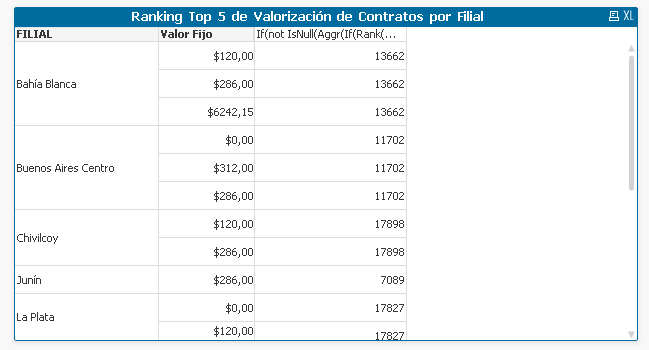
Does this look right?
Facundo
- Mark as New
- Bookmark
- Subscribe
- Mute
- Subscribe to RSS Feed
- Permalink
- Report Inappropriate Content
Thanks, that fixed the problem, but now i figured out that if you have selected just one FILIAL, you can see 5 values for that FILIAL, but if you have selected many FILIAL, you can't see 5 values per FILIAL!
sunny_talwar
- Mark as New
- Bookmark
- Subscribe
- Mute
- Subscribe to RSS Feed
- Permalink
- Report Inappropriate Content
Check now

Facundo
- Mark as New
- Bookmark
- Subscribe
- Mute
- Subscribe to RSS Feed
- Permalink
- Report Inappropriate Content
PERFECT!, thanks you very much!, it was driving me crazy.
