Unlock a world of possibilities! Login now and discover the exclusive benefits awaiting you.

- Qlik Community
- :
- All Forums
- :
- QlikView
- :
- Re: Sum over aggr (in text object)
- Subscribe to RSS Feed
- Mark Topic as New
- Mark Topic as Read
- Float this Topic for Current User
- Bookmark
- Subscribe
- Mute
- Printer Friendly Page

- Mark as New
- Bookmark
- Subscribe
- Mute
- Subscribe to RSS Feed
- Permalink
- Report Inappropriate Content
Sum over aggr (in text object)
Dear Community,
i have a straight table with one dimension 'Group' and one expression '=SUM(Aggr(SUM(AMOUNT),GROUP))'
On the top are the totals by expression
The result looks like this :
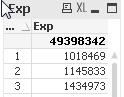
Now i want to display the total 49398... directly inside a text object as a key performance indicator using the same expression
=SUM(Aggr(SUM(AMOUNT),GROUP)). But its not working as the number is not the same comparing with the straight table total
What i am making wrong? Please help
- « Previous Replies
-
- 1
- 2
- Next Replies »
- Mark as New
- Bookmark
- Subscribe
- Mute
- Subscribe to RSS Feed
- Permalink
- Report Inappropriate Content
See attachement below

 maxgro
- Mark as New
- Bookmark
- Subscribe
- Mute
- Subscribe to RSS Feed
- Permalink
- Report Inappropriate Content
maybe
=sum({$ <Group={"*"}>} Amount)
- Mark as New
- Bookmark
- Subscribe
- Mute
- Subscribe to RSS Feed
- Permalink
- Report Inappropriate Content
Hi Maxgro,
your solution is not interactive? For example when chossing group A the text object value does not equal with the correct total value of the sraight table. Any idea how to make it possible?
maxgro
- Mark as New
- Bookmark
- Subscribe
- Mute
- Subscribe to RSS Feed
- Permalink
- Report Inappropriate Content
maybe this
=sum({$ <Group*={"*"}>} Amount)
- Mark as New
- Bookmark
- Subscribe
- Mute
- Subscribe to RSS Feed
- Permalink
- Report Inappropriate Content
Best answer till now
- « Previous Replies
-
- 1
- 2
- Next Replies »