Unlock a world of possibilities! Login now and discover the exclusive benefits awaiting you.

- Qlik Community
- :
- All Forums
- :
- QlikView
- :
- Re: Sum per quarter
- Subscribe to RSS Feed
- Mark Topic as New
- Mark Topic as Read
- Float this Topic for Current User
- Bookmark
- Subscribe
- Mute
- Printer Friendly Page

- Mark as New
- Bookmark
- Subscribe
- Mute
- Subscribe to RSS Feed
- Permalink
- Report Inappropriate Content
Sum per quarter
Hello. I've got table looking like this:
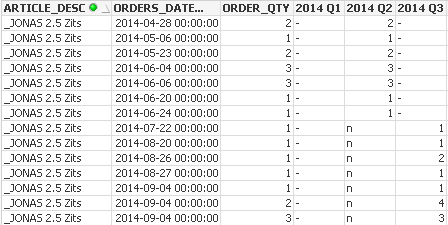
When i have column with date, everything works.
Expression from table Q3:
IF(Month(ORDERS_DATE_INSERT) > 6 and Month(ORDERS_DATE_INSERT) <= 9 and Year(ORDERS_DATE_INSERT) = Year(Today()) - 1, SUM(ORDER_QTY))
I tried do something like this:
SUM({<ORDERS_DATE_INSERT={"<=QuarterEnd('2014-12-12')"}>} ORDER_QTY)
or this:
SUM({<Month(ORDERS_DATE_INSERT)={"<=3"}>} ORDER_QTY)
but none of this is working properly.
When I remove date, the table looks like this:

None value is displayed.
Have you got any idea what should I do to make it work?
Accepted Solutions

 rubenmarin
- Mark as New
- Bookmark
- Subscribe
- Mute
- Subscribe to RSS Feed
- Permalink
- Report Inappropriate Content
Hi Zelman, the easiest is create the quarter field in the script, in the table where you load ORDERS_DATE_INSERT create a field:
'Q' & Ceil(ORDERS_DATE_INSERT/3) as Quarter,
Year(ORDERS_DATE_INSERT) as Year
Then you only need:
SUM({<Quarter={'Q3'}, Year={'2014'}>} ORDER_QTY)
Otherwise you must work with those timestamps, something like:
SUM({<ORDERS_DATE_INSERT={">=2014-04-01 00:00:00<=2014-06-30 23:59:59"}>} ORDER_QTY)
rubenmarin
- Mark as New
- Bookmark
- Subscribe
- Mute
- Subscribe to RSS Feed
- Permalink
- Report Inappropriate Content
Hi Zelman, the easiest is create the quarter field in the script, in the table where you load ORDERS_DATE_INSERT create a field:
'Q' & Ceil(ORDERS_DATE_INSERT/3) as Quarter,
Year(ORDERS_DATE_INSERT) as Year
Then you only need:
SUM({<Quarter={'Q3'}, Year={'2014'}>} ORDER_QTY)
Otherwise you must work with those timestamps, something like:
SUM({<ORDERS_DATE_INSERT={">=2014-04-01 00:00:00<=2014-06-30 23:59:59"}>} ORDER_QTY)

 pratap6699
- Mark as New
- Bookmark
- Subscribe
- Mute
- Subscribe to RSS Feed
- Permalink
- Report Inappropriate Content
if(len(ORDERS_DATE_INSERT)>0,'Q' & Ceil(Month(ORDERS_DATE_INSERT/3))) as Quarter,
Year(ORDERS_DATE_INSERT) as Year
expression
SUM({<Quarter={'Q3'}, Year={'Year(today()-1)'}>} ORDER_QTY)
it displays 01-04-2014 to 30-06-2014 sum of ORDER_QTY