Unlock a world of possibilities! Login now and discover the exclusive benefits awaiting you.

- Qlik Community
- :
- All Forums
- :
- QlikView
- :
- Sum(value) in different hour
- Subscribe to RSS Feed
- Mark Topic as New
- Mark Topic as Read
- Float this Topic for Current User
- Bookmark
- Subscribe
- Mute
- Printer Friendly Page

 pascos88
- Mark as New
- Bookmark
- Subscribe
- Mute
- Subscribe to RSS Feed
- Permalink
- Report Inappropriate Content
Sum(value) in different hour
Hello everyone,
I have the hour field and for each 15 minuts a value.
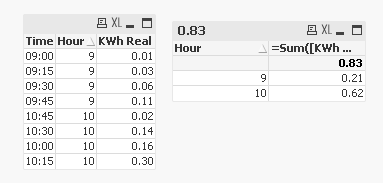
I need to sum the value for each hours. In the immage attached for example I need to have a value 0.21 for 09, 0.62 for 10 etc.
Thanks for any help
Pasquale

Accepted Solutions

 sunny_talwar
- Mark as New
- Bookmark
- Subscribe
- Mute
- Subscribe to RSS Feed
- Permalink
- Report Inappropriate Content
May be use a calculated dimension:
Calculated Dimension: Hour(Hour)
Expression: Sum([KWh Real])
sunny_talwar
- Mark as New
- Bookmark
- Subscribe
- Mute
- Subscribe to RSS Feed
- Permalink
- Report Inappropriate Content
May be use a calculated dimension:
Calculated Dimension: Hour(Hour)
Expression: Sum([KWh Real])

 swuehl
- Mark as New
- Bookmark
- Subscribe
- Mute
- Subscribe to RSS Feed
- Permalink
- Report Inappropriate Content
Just replace your currently used dimension with a calculated dimension:
=Hour( YourHourField)
 rubenmarin
- Mark as New
- Bookmark
- Subscribe
- Mute
- Subscribe to RSS Feed
- Permalink
- Report Inappropriate Content
Hi Pascuale, you can create a dimension with only the hour part:
Hour(Time_Field)
Can be a calculated dimension or a field created in script.
Then just an expression like Sum(Value_Field) should return the values grouped by hour
sunny_talwar
- Mark as New
- Bookmark
- Subscribe
- Mute
- Subscribe to RSS Feed
- Permalink
- Report Inappropriate Content
Alternatively, calculate Hour in the script
SET TimeFormat='hh:mm';
Table:
LOAD Hour as Time,
Hour(Hour) as Hour,
[KWh Real]
Inline [
Hour, KWh Real
09:00, 0.01
09:15, 0.03
09:30, 0.06
09:45, 0.11
10:00, 0.16
10:15, 0.30
10:30, 0.14
10:45, 0.02
];

- Mark as New
- Bookmark
- Subscribe
- Mute
- Subscribe to RSS Feed
- Permalink
- Report Inappropriate Content
Hi,
try
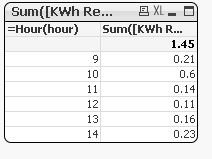
in your dimension Hour(hour) ,
in your expessions Sum([KWh Real])
Regards.