Unlock a world of possibilities! Login now and discover the exclusive benefits awaiting you.

Announcements
Now accepting applications for the Qlik Luminary and Partner Ambassador Programs: Apply by July 6!
- Qlik Community
- :
- All Forums
- :
- QlikView
- :
- Re: Tab Properties
Options
- Subscribe to RSS Feed
- Mark Topic as New
- Mark Topic as Read
- Float this Topic for Current User
- Bookmark
- Subscribe
- Mute
- Printer Friendly Page
Turn on suggestions
Auto-suggest helps you quickly narrow down your search results by suggesting possible matches as you type.
Showing results for

 knightwriter
Creator III
2015-07-30
07:20 AM
- Mark as New
- Bookmark
- Subscribe
- Mute
- Subscribe to RSS Feed
- Permalink
- Report Inappropriate Content
Tab Properties
Hi All,
Is it possible to get rid of the tab name at the top to push the sheet up that bit more?

861 Views
1 Solution
Accepted Solutions

 robert_mika
MVP
2015-07-30
07:22 AM
- Mark as New
- Bookmark
- Subscribe
- Mute
- Subscribe to RSS Feed
- Permalink
- Report Inappropriate Content
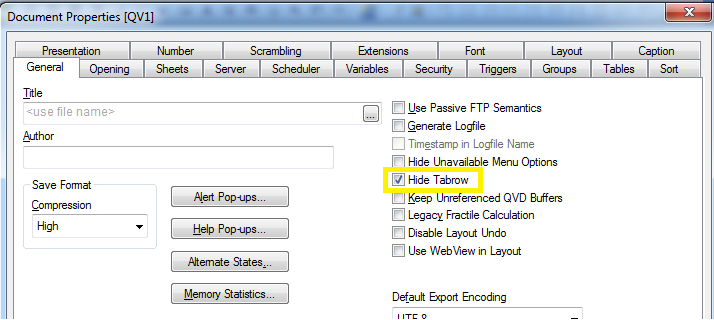
Settings-Document Properties-Hide Tabrow
799 Views
3 Replies
robert_mika
MVP
2015-07-30
07:22 AM
- Mark as New
- Bookmark
- Subscribe
- Mute
- Subscribe to RSS Feed
- Permalink
- Report Inappropriate Content
Settings-Document Properties-Hide Tabrow
800 Views

 qumniusomnius
Contributor III
2015-07-30
07:23 AM
- Mark as New
- Bookmark
- Subscribe
- Mute
- Subscribe to RSS Feed
- Permalink
- Report Inappropriate Content
yes:
settings -> Document properties: check Hide Tabrow on the right in the menu.
799 Views
 sunny_talwar
MVP
2015-07-30
07:23 AM
- Mark as New
- Bookmark
- Subscribe
- Mute
- Subscribe to RSS Feed
- Permalink
- Report Inappropriate Content
Try checking Hide Tabrow under Document properties: