Unlock a world of possibilities! Login now and discover the exclusive benefits awaiting you.

- Qlik Community
- :
- All Forums
- :
- QlikView
- :
- Text Objects Issue
- Subscribe to RSS Feed
- Mark Topic as New
- Mark Topic as Read
- Float this Topic for Current User
- Bookmark
- Subscribe
- Mute
- Printer Friendly Page

- Mark as New
- Bookmark
- Subscribe
- Mute
- Subscribe to RSS Feed
- Permalink
- Report Inappropriate Content
Text Objects Issue
Hi Community ,
I have already build in dashboards with multiple sheet and objects , I need to make some modification in the front end of the dashboard to delete some sheets & text objects . So, some of the text objects once I try to remove it other text objects effect with it and remove it also !!
Is there any links between them or variables !?
Please can you advise me How i can handle it .
Regards ,

 Chanty4u
- Mark as New
- Bookmark
- Subscribe
- Mute
- Subscribe to RSS Feed
- Permalink
- Report Inappropriate Content
if u used that object id's in any other charts or container object?
May be varibles by using that objects also u can chk it.
or
that object linking to any other objects please do chk it.
or
did u given any triggers on that objects please chk .
or
any show hide properties do u hve ?

 agustinbobba
- Mark as New
- Bookmark
- Subscribe
- Mute
- Subscribe to RSS Feed
- Permalink
- Report Inappropriate Content
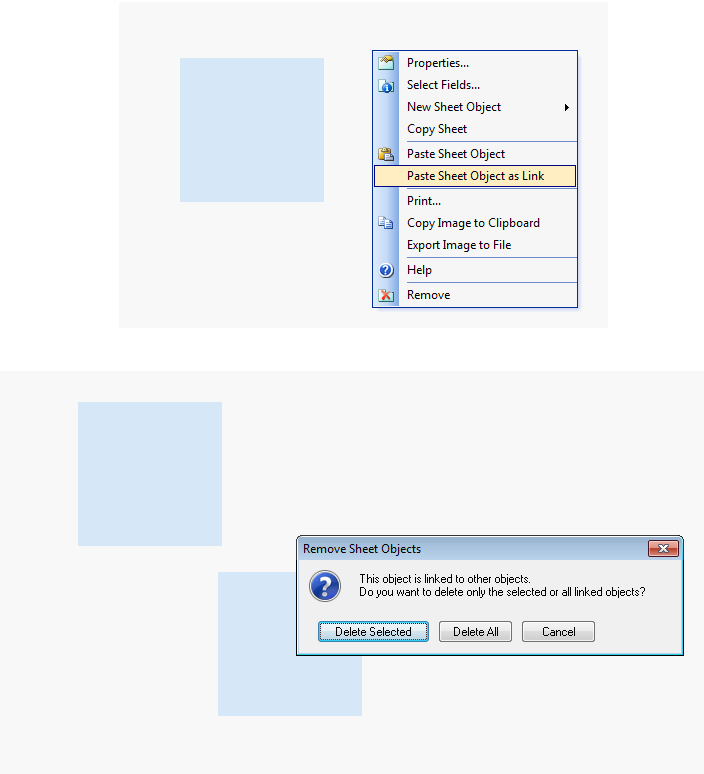
Maybe you paste the object as a link, so when you change or delete one modify all..
- Mark as New
- Bookmark
- Subscribe
- Mute
- Subscribe to RSS Feed
- Permalink
- Report Inappropriate Content
Hi chanty
Yes , I think there is variables ( vShow/vHide ) by using the object , I mean once i click on one of the text objects
and choose remove object the others are removes except what I click on it !
Please advise and thanks on advance .
Regards ,