Unlock a world of possibilities! Login now and discover the exclusive benefits awaiting you.

- Qlik Community
- :
- All Forums
- :
- QlikView
- :
- Timestamp conversion to custom format
- Subscribe to RSS Feed
- Mark Topic as New
- Mark Topic as Read
- Float this Topic for Current User
- Bookmark
- Subscribe
- Mute
- Printer Friendly Page

- Mark as New
- Bookmark
- Subscribe
- Mute
- Subscribe to RSS Feed
- Permalink
- Report Inappropriate Content
Timestamp conversion to custom format
Hello everyone,
I have a column in one of my qvd with timestamp as in the below format.
30.05.2016 07:35 AM
03.06.2016 06:48 AM
19.02.2016 09:54 AM
05.05.2016 06:56 AM
08.05.2016 01:49 AM
14.12.2015 10:37 AM
14.12.2015 04:34 PM
28.12.2015 04:45 AM
I want to display this as mm/yyyy .
In one of my previous qvd the data was like below:
2013-10-13
2013-10-13
2013-10-14
2013-10-14
2013-10-15
2013-10-15
2013-10-15
2013-10-15
I simply loaded and used the expression If(Year(Period)='2016',Aggr(DISTINCT(Year(Period)&'/'& Num(Month(Period))),Period)) to display in mm/yyyy format. But the same expression is not working in m current format 28.12.2015 04:45 AM .
I tried conversion functions, but no luck . please help.
-James
Accepted Solutions

 sunny_talwar
- Mark as New
- Bookmark
- Subscribe
- Mute
- Subscribe to RSS Feed
- Permalink
- Report Inappropriate Content
Try this in the script to normalize this into one date format:
LOAD Date(MonthStart(Alt(Num(Date#(DateField, 'DD.MM.YYYY hh:mm TT')), Num(Date#(DateField, 'YYYY-MM-DD')))), MM/YYYY) as MonthYear,
Date(Floor(Alt(Num(Date#(DateField, 'DD.MM.YYYY hh:mm TT')), Num(Date#(DateField, 'YYYY-MM-DD'))))) as DateField

 ecolomer
- Mark as New
- Bookmark
- Subscribe
- Mute
- Subscribe to RSS Feed
- Permalink
- Report Inappropriate Content
See this link:
sunny_talwar
- Mark as New
- Bookmark
- Subscribe
- Mute
- Subscribe to RSS Feed
- Permalink
- Report Inappropriate Content
Try this in the script to normalize this into one date format:
LOAD Date(MonthStart(Alt(Num(Date#(DateField, 'DD.MM.YYYY hh:mm TT')), Num(Date#(DateField, 'YYYY-MM-DD')))), MM/YYYY) as MonthYear,
Date(Floor(Alt(Num(Date#(DateField, 'DD.MM.YYYY hh:mm TT')), Num(Date#(DateField, 'YYYY-MM-DD'))))) as DateField
 maxgro
- Mark as New
- Bookmark
- Subscribe
- Mute
- Subscribe to RSS Feed
- Permalink
- Report Inappropriate Content
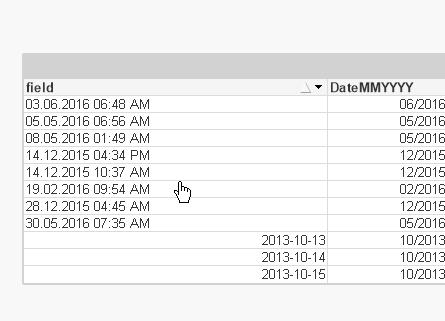
load
*,
Date(
alt(floor(Date#(field, 'DD.MM.YYYY hh:mm TT')), Date#(field, 'YYYY-MM-DD')),
'MM/YYYY'
) as DateMMYYYY
inline [
field
30.05.2016 07:35 AM
03.06.2016 06:48 AM
19.02.2016 09:54 AM
05.05.2016 06:56 AM
08.05.2016 01:49 AM
14.12.2015 10:37 AM
14.12.2015 04:34 PM
28.12.2015 04:45 AM
2013-10-13
2013-10-13
2013-10-14
2013-10-14
2013-10-15
2013-10-15
2013-10-15
2013-10-15
];
sunny_talwar
- Mark as New
- Bookmark
- Subscribe
- Mute
- Subscribe to RSS Feed
- Permalink
- Report Inappropriate Content
Massimo -
Wouldn't it make sense to add MonthStart() so that DateMMYYYY doesn't repeat in the listbox?
- Mark as New
- Bookmark
- Subscribe
- Mute
- Subscribe to RSS Feed
- Permalink
- Report Inappropriate Content
Sunny ,
Your load command:
Date(Floor(Alt(Num(Date#(Created, 'DD.MM.YYYY hh:mm TT')), Num(Date#(Created, 'YYYY-MM-DD'))))) worked when i used it along with my expression in my table:
=If(Year(NCFPeriod)='2016',Aggr(DISTINCT(Year(NCFPeriod)&'/'& Num(Month(NCFPeriod))),NCFPeriod))
But the sort order should be ascending according to date. Please find the snapshot where the sort is not correct even after giving 'ascending' in the 'sort' tab. please help.
- James
 sunny_talwar
- Mark as New
- Bookmark
- Subscribe
- Mute
- Subscribe to RSS Feed
- Permalink
- Report Inappropriate Content
Can you share the script you are using for the Month field? It is formatted as YYYY/MM, not sure if it is text of date field
- Mark as New
- Bookmark
- Subscribe
- Mute
- Subscribe to RSS Feed
- Permalink
- Report Inappropriate Content
Sunny ,
It is working fine with the sorting Numeric value = Ascending and Text A->Z .
Thanks a ton !
-James

 gabriel_as
- Mark as New
- Bookmark
- Subscribe
- Mute
- Subscribe to RSS Feed
- Permalink
- Report Inappropriate Content
La respuesta mas simple es:
al momento de hacer la consulta, ej:
LOAD
DocDate
;
SELECT
convert(varchar(10),cast(DateField as date),103) as DocDate
FROM MyTable;
103 es un codigo propio de los formatos de fecha en SQL, se pueden referir a la pagina:
https://msdn.microsoft.com/en-us/library/ms187928.aspx
y mas sencillo es como lo refiere el link Enrique Colomer
date(floor(DateField),'DD/MM/YYYY') as newDate
Saludos